
The in-app Help panel
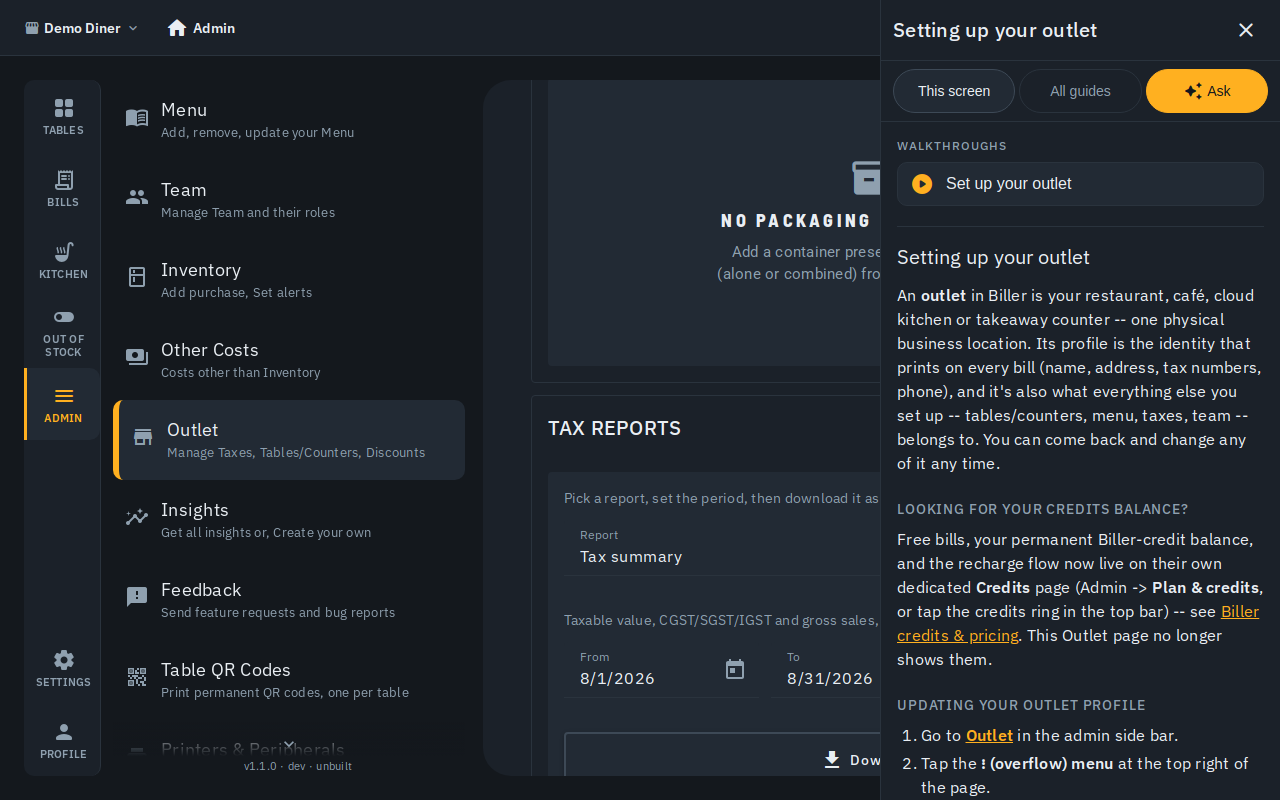
Help now opens inside the app instead of sending you off to a separate website. Tap Help -- the question-mark icon on the top bar, right of the notification bell -- and a panel slides in from the right. The app stays exactly where it was behind it, so you can read a step and do it at the same time. Everyone on the team can open it: admin, cashier, waiter and kitchen.
The guide for the screen you're on
The panel opens on the guide that matches wherever you already are -- e.g. Making a bill on the billing screen, the printer setup guide on Printers. Below that is All guides -- every article, grouped by topic, plus a search box.
Links that take you there
Inside a guide, a link to another guide opens it right there in the panel -- you never lose your place. A link to a screen in the app moves the app behind the panel to that screen and leaves the panel open, so the instructions stay on screen while you follow them. Back returns to wherever you came from.
Walkthroughs
If the screen you're on has a guided walkthrough, the panel lists it under Walkthroughs. Tap one and the panel steps aside while the walkthrough highlights each part of the screen in turn -- the same walkthrough as Show walkthrough in the screen's own "..." menu.
Ask a question
The Ask tab is an assistant that answers in plain language, using only these help guides plus a short description of whatever screen you're standing on. Type a question like "how do I add a tax?" and it answers with links to the guides it used.
It remembers your last few messages in the same conversation. Past 10 messages, the panel lets you know it's only keeping the most recent ones in mind.
Extra things it can do:
- Show me how -- offers to start an existing walkthrough for what you asked about.
- Walk me through my question -- for a multi-step question, puts together a short, one-off walkthrough on the spot.
- Take me there -- offers a button to jump to a different screen if that's really what the answer is about. It only moves you when you tap it.
If the assistant doesn't know something, it says so, points you at the closest guide, and offers Send this to support -- one tap files it as feedback (pre-filled with what you asked). Track it from the Feedback screen.
There's a daily limit on questions per outlet so this stays fast and free for everyone. If you reach it, the panel tells you -- guides, walkthroughs and search all keep working as normal.
On a phone
At phone widths the panel fills the screen instead of sitting beside the app. Close it with the ✕ at the top.