 ILLER
ILLERGST billing
If your outlet is GST-registered, Biller can put your GSTIN and an itemised tax breakup on every bill. Biller keeps this simple and under your control: you tell it which GST components to charge and at what percentage, and it applies and totals them for you on each bill.
What Biller does (and doesn't) do
It helps to be clear up front:
- Biller does print your GSTIN on bills, let you set up CGST/SGST (or any other tax) as reusable percentages, apply them per table/counter, and compute the tax and grand total live as you build a bill.
- Biller does not decide the correct GST rate for a dish for you, look up HSN/SAC codes, generate e-invoices/IRNs, or file your GST returns. You set the rates that apply to your outlet; picking the right slab and filing remain your (or your accountant's) call.
1. Put your GSTIN on your bills
- Go to Outlet in the admin side bar, open the ⋮ menu and choose Update Profile.
- Fill in GSTIN with your GST registration number and tap Update.
Your GSTIN only prints on the bill once it's set -- leave it blank if you're not GST-registered. See Setting up your outlet for the full profile.
2. Set up your GST components as taxes
Biller treats GST the same way it treats any tax or charge -- as a named percentage in your outlet's tax catalog. For a typical intra-state restaurant bill you'd add two:
- Go to Outlet → Moving charges → New Tax or Charge.
- Add CGST with its percentage (e.g.
2.5). - Add SGST with its percentage (e.g.
2.5). - Toggle Default on for each if you want new tables/counters to pick them up automatically.
Keeping CGST and SGST as two separate entries means both show as their own line on the printed bill, which is what a GST bill is expected to show. If your situation calls for IGST instead, add that as its own entry the same way.
See Taxes & charges for the full catalog and edit flow.
3. Apply GST to the right tables/counters
Taxes aren't applied everywhere automatically -- each table/counter (Dine In, Takeaway, and so on) has its own list of which taxes apply. Add your CGST and SGST entries to each table/counter that should carry them (new tables/counters start with whatever you marked Default). This lets you, for example, apply a different set of charges to a takeaway bill than a dine-in one.
4. It totals on every bill
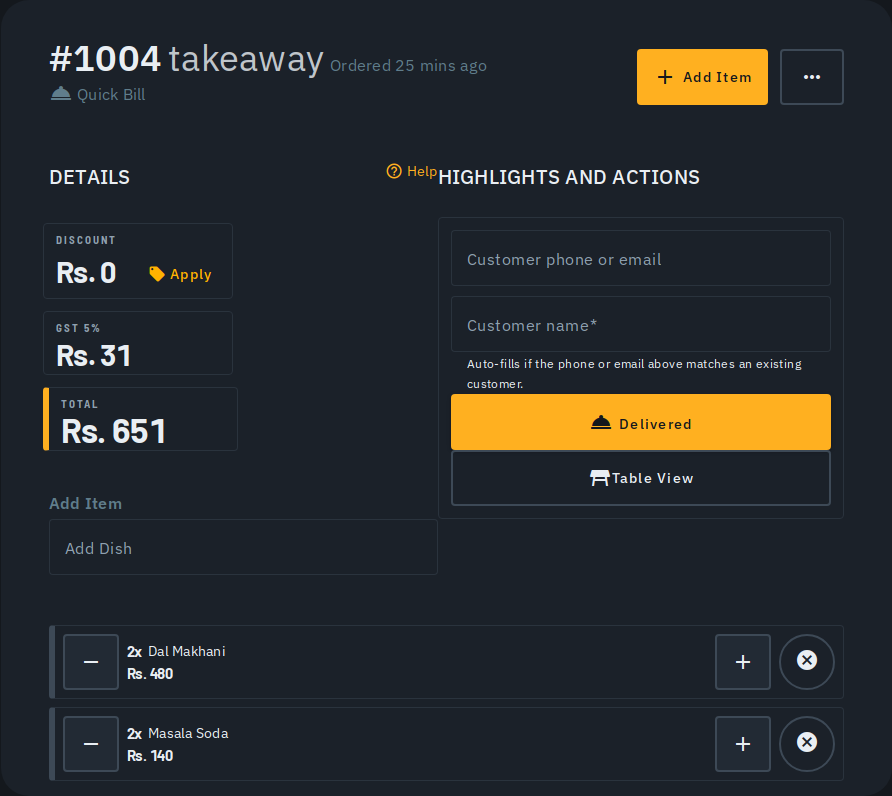
When you build a bill, its Details panel shows one line per applicable tax and a grand total that updates live as you add items -- so CGST and SGST each appear as their own line, computed on the bill's item total. See Making a bill.
5. Print a GST Tax Invoice for a completed bill
Once a bill is completed, Biller can generate a proper GST Tax Invoice -- the compliance document (not the customer receipt) that carries your sequential invoice number, GSTIN, and a full tax breakup per item.
- Open the completed bill on the Billing screen.
- Open the ⋮ overflow menu at the top and choose Tax Invoice.
- A print-ready page opens showing your outlet's GSTIN, the invoice number, the recipient's details, one line per item with its HSN/SAC code and CGST/SGST (or IGST) amount, and the totals.
- Tap Print / Save as PDF and choose Save as PDF in the print dialog (or print it directly) -- no separate app or download needed.
The invoice number is assigned automatically, in sequence, the moment a bill is completed -- you never enter or edit it. A bill completed before this feature existed shows its bill code instead, with a note that it has no GST invoice number.
HSN/SAC codes come from each menu item's own HSN/SAC field. If an item has never had one set, its row shows a dash instead of a code -- setting HSN/SAC codes on menu items isn't available from the app yet; ask your accountant for the right codes in the meantime.
Tips
- Change a rate once, in Moving charges, and it applies to every new bill of the types it's attached to -- you don't edit it per bill.
- Because you define the percentages, Biller adapts to whatever your outlet is registered for -- it never silently assumes a slab on your behalf.
- Automated GST return filing and e-invoicing aren't part of Biller today. Use the bills and Insights as your record of sales, and hand your accountant the figures for filing.