 ILLER
ILLERHelp
AI insights
The Insights screen leads with a plain-English AI summary of how your outlet is doing, backed underneath by the same numbers as its charts.
The AI digest
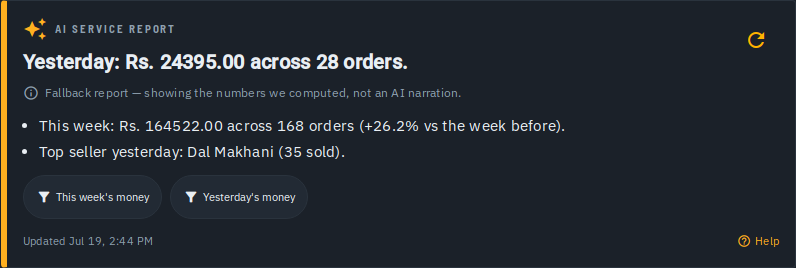
At the top of Insights is a daily, auto-generated digest:
- A headline sentence, plus a few bullet points calling out what stood out -- what sold, how sales moved, and similar callouts, in plain English rather than raw numbers.
- Depending on what's enabled for your outlet, you may also see a What to do section with a couple of concrete, actionable suggestions, and suggested filter chips you can tap to jump straight to that slice of the data below.
- Tap the refresh icon to regenerate the digest on demand -- this is cooldown-limited, so regenerating again too soon shows a message telling you when you can next.
- If the AI narration couldn't be generated, the digest falls back to a clearly labelled "Fallback report" built from the same underlying numbers -- never silently pretending to be an AI summary it isn't.
Every digest ends with "AI-generated -- verify before acting" -- treat it as a fast first read, not the final word.
The charts underneath
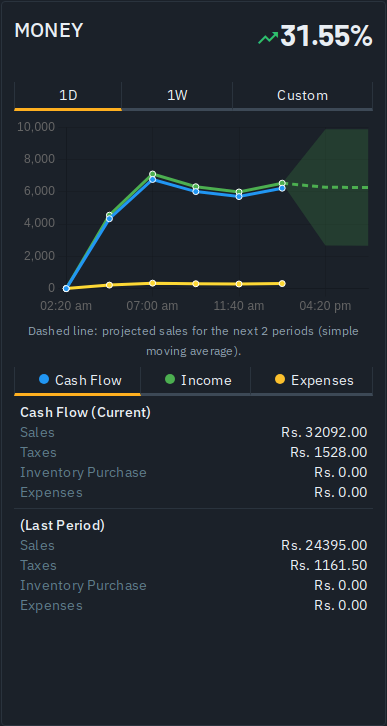
Below the digest, Money, Customers and Kitchen each get their own card:
- Pick a range (e.g. Today, Week, Month) to see that card's trend line and a growth indicator (up/down/flat vs. the previous period).
- Where enough sales history exists, a dashed line projects the next few periods (a simple moving average) alongside the real data -- outlets without enough history yet see a note instead, rather than an unreliable projection.
Guided tour
The first time you open this page, a short guided tour walks through the AI digest, a card's overview, its timeframe picker, and the rest of the cards below. It only shows itself once; if you want to see it again, open the "..." menu and pick Take a Tour.
Tips
- The AI digest and the charts read the same underlying data -- the digest is a narrated summary of it, not a separate number.
- The "What to do" recommendations and the digest language switcher are being rolled out gradually -- you may not see them yet on every outlet.
- A digest with the fallback badge is still accurate (it's the same computed stats), just without the AI narration layer on top.