
Biller credits & pricing
Since 28 August 2026, Biller.app runs on a plan + Biller-credits model -- see What changed on 28 August 2026 for the switch itself. There is no more daily free-bills tier.
The starter grant
Every new outlet gets 510 Biller credits, once, and they never expire. If your outlet existed before the switch, you instead got one full year of the plan, free, through 28 August 2027, plus the same 510 credits.
Plans -- unlimited billing
| Plan | Price | Credits included |
|---|---|---|
| Monthly | ₹499 / month | 100 Biller credits |
| 3 months | ₹1,399 (7% off) | 300 Biller credits |
| 6 months | ₹2,699 (10% off) | 600 Biller credits |
| 12 months | ₹5,299 (12% off) | 1,200 Biller credits |
Voice billing comes with the 6- and 12-month plans; on the 1- and 3-month plans it is a monthly add-on, and each plan on the Plan & credits page shows which applies. A plan bills unlimited bills for its term; it runs to term with no refunds, and cancellation only stops renewal. All prices include GST. On Android, in-app prices are the ones shown in the app at checkout (Google Play's own cut is already built in).
Cancelling your plan
If your plan auto-renews (bought on the website), tap Stop subscription on the Plan & credits page -- it stays active until the date shown, then won't renew or charge again. Bought through the Android app instead? Cancel from the Play Store's own Subscriptions screen. A one-time plan grant that never auto-renewed just ends on its own date; there's nothing to cancel. The full terms, and this article, are in the ⋮ menu at the top of Plan & credits.
Buying Biller credits
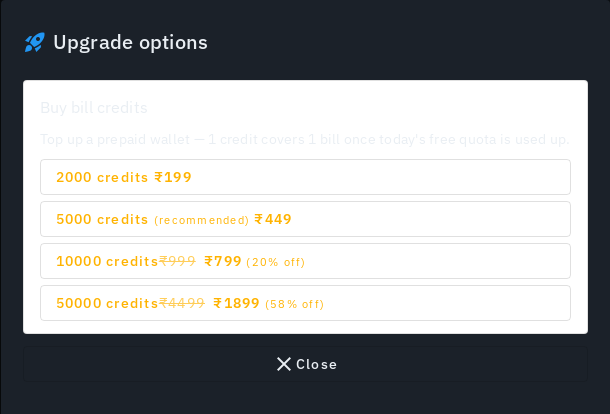
From the Credits page (Admin -> Plan & credits, or the credits ring in the top bar), tap Recharge Biller credits. Credits are yours for lifetime -- they never expire and carry over indefinitely.
The current packs:
| Pack | Credits | Price |
|---|---|---|
| Starter | 2,000 | ₹399 |
| Growth (25% off) | 5,000 | ₹749 |
Prices include GST. Any discounted pack shows its original price struck through, so what you see is what you'll be charged.
When is a credit used?
A bill uses its credit when you complete it -- not when you open it, add items or send it to the kitchen. Every open bill, a bill saved as a draft and a bill you cancel before completing costs nothing. If your outlet is on an active plan, completing a bill uses no credit at all; otherwise it uses one prepaid credit, and if there is none left the bill is not completed (you are asked to top up).
A credit comes back automatically if the completion fails, and if you later cancel a bill you had already completed. Bringing your trial bill into a new outlet when you sign up counts as one completed bill, so it uses one credit.
What an AI button costs
Every AI button shows its cost on the button itself, such as Check 4 items (4 credits). One tap is the whole decision -- there is no second "are you sure" screen. Asking again about something AI already answered costs nothing, and a run that fails is refunded. The credit ring in the top bar refreshes after each spend.
Low-credit alerts
You'll see an in-app alert at 100 credits left, and again at 50 -- so you're never surprised mid-service.
Paying
Checkout runs through Razorpay. Once payment is confirmed, credits land in your wallet immediately -- no waiting, no manual approval. A confirmed purchase also shows up automatically in your Expense report (category "Software / Biller credits").
What each action costs
Each AI button also shows its own price. A plan covers bills, not these actions.
| Action | Credits |
|---|---|
| Bill completed (no active plan) | 1 |
| Ingredient suggestions, per dish | 1 |
| Menu photo, generated | 1 |
| Menu photo, correction | 2 |
| Menu photo, your own upload | 0 |
| Menu item description | 1 |
| Receipt scan | 1 |
| Tax profile proposal | 1 |
| AI Insights summary | 1 |
| Offer suggestions, per run | 3 |
| Promotion draft, message and poster | 5 |
| Promotion poster alone | 3 |
| Logo cleanup, per pass | 2 |
| Voice billing, per phrase | 1 |
| SMS bill receipt | 5 |
Voice billing costs nothing on a 6- or 12-month plan, which include it. On a 1- or 3-month plan it is a paid add-on instead of a per-phrase charge. With no plan at all, each spoken phrase costs 1 credit, and the Voice screen says so under the mic with your balance and a Plans link.
What credits pay for, now and later
One Biller credit covers one bill, unless your outlet is on an active plan (unlimited bills). AI features cost credits too: 1 credit per item -- one per dish you ask for ingredients for, one per menu photo generated or regenerated, one per AI-written menu-item description. A bulk run of 20 dishes costs 20. A photo correction (regenerating a photo with your own feedback) costs 2 credits per photo. Every other AI action that spends credits is in the table above.
AI Insights (the "AI service report" on your Insights page) costs 1 credit for the AI-written summary, at most once an hour -- viewing it again within the hour, or changing the date range/duration of the plain sales and stock numbers below it, is always free. You can switch AI Insights off entirely from Plan & credits -> AI and SMS settings: with it off, you still get the same plain numbers for free, just without the AI-written summary.
SMS bill receipts are temporarily unavailable (the toggle in Plan & credits -> AI and SMS settings is disabled) while we set up a new SMS provider. Nothing is ever sent, and nothing is ever charged, while this is off. Bills still reach customers by email, QR code, or WhatsApp -- see Printing.
Wherever a button spends credits, the button itself shows the cost (e.g. "Generate description (1 credit)"). For anything costing 5 or more credits, or when your balance is getting low, you'll see a one-time confirm step first -- routine 1-credit clicks never interrupt you with a dialog.
Every credit-spending button draws from the same wallet your bills draw from -- your starter grant, a plan's monthly top-up, and any purchased credits all sit in one balance.
You're only charged for what the AI actually produces -- every item that fails or comes back empty is refunded automatically, and a failed SMS send is refunded too. If a bulk run needs more than you have left, run it on as many items as your balance covers, or top up and run the lot. Billing itself is never blocked by this.
What's never charged: your plain (non-AI) Insights numbers, and every report export -- reading your own data never costs a credit.
Aggregator orders (Swiggy/Zomato) are planned to cost credits once that integration ships; the rate isn't finalized yet.
Seeing what you've spent
Open the Usage row on the Plan & credits page. It shows a small 7-day bills-per-day chart -- every completed bill, whether it drew from your credits or your plan -- and below it a per-day chart of everything that's cost a credit: bills, AI ingredient suggestions, AI menu images and receipt scans, for the last 7 or 30 days. Tap a day to drill into exactly what ran, when, how many credits it cost, and any refund.
One plan per outlet, one wallet for all
A plan covers only the outlet it was bought for, so each outlet you add needs its own. Biller credits are the opposite: every outlet spends from the same wallet, which the Plan & credits page marks as Shared.
Tips
- Pack prices and sizes may change over time; the price you already paid never changes retroactively. See the pricing page for the most current, public version of this ladder.
- Your current balance is always shown on the Credits page and in the billing sidebar.