
Taxes & charges
Biller keeps taxes and charges as two separate steps: first you build a catalog of taxes/charges for your outlet, then you pick which of those apply to each table/counter.
Adding a tax or charge to your outlet
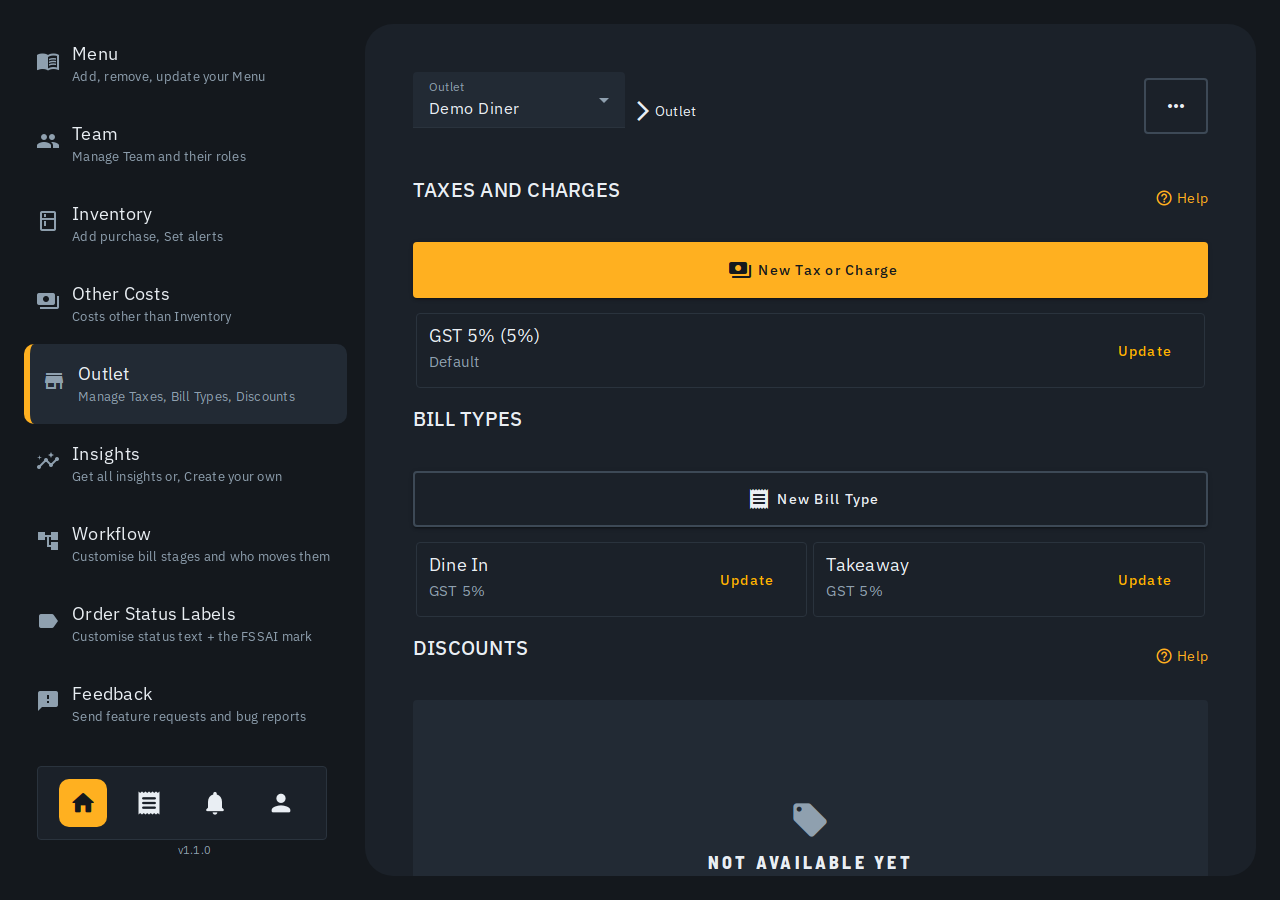
- Go to Outlet › Taxes & charges in the admin side bar.
- Tap New tax or charge.
- Pick a Tax type from the dropdown. The choices are scoped to your
outlet's own business type, each named after the business it's for with
the rate second, and a one-line hint of who it's for -- a food outlet
sees, for example, "Restaurant & food service -- GST 5%" and "Delivering
to another state -- IGST 5%"; a general/retail outlet sees "Standard
goods -- GST 18%", "Essential goods -- GST 5%", and "Precious stones &
bullion -- GST 3%" instead. Nil-rated/exempt (0%) is offered either way.
- A GST rate adds the correct complete pair of lines for you -- CGST + SGST for a bill within your own state, or a single IGST line for a bill you're sending to another state -- at the rate you picked. You never type a GST name or split the percentage yourself.
- Other charge (not GST) is for anything that isn't GST -- a packing charge, delivery fee, or cess. Choosing it reveals Tax Name and Tax Percentage fields to fill in by hand.
- Below the fields, the sheet shows exactly what your bill will print -- a real receipt/invoice built from your current settings plus this pick, with a switcher to check it as A4, 80mm, or 58mm paper before you save.
- Charge this on every new table and counter -- toggle on if new tables/counters should have this tax/charge applied automatically.
- Also add it to your N existing tables and counters -- ON by default when editing a tax, OFF when adding a new one. The first toggle above only ever affects tables/counters you create AFTER this point; turn this one on too if you also want it added to the ones you already have.
- Apply on total including taxes -- leave off for GST. Turn on only for a cess/levy charged on the bill total after the other taxes. Shops are not offered this. A shop adds GST per item, and any cess, fee, packing or delivery charge a shop adds is part of the taxable value (CGST Act s.15(2)), so it goes on the bill with Other charge, Packaging or Delivery and is added before GST.
- Tap Add.
A GST rate is ONE CARD even though it's really two rows underneath (CGST + SGST) -- the card's name is the combined rate (e.g. "GST 5%"), and a Prints on the bill as panel inside it shows the real rows that print on the invoice and file in your GST return. A non-GST charge (packing charge, delivery fee, cess) is its own single-row card, named plainly (e.g. "Packaging charge 2%"). Each card's second line is the blast radius of tapping Update: a GST card says how many menu items it charges (every item -- a restaurant's GST card is all-or-nothing; items taxed at their own rate are set per item in a shop outlet, see Different rates per item below), a non-GST charge says how many tables/counters it's added to. Tap Update on a card to change it: a card that was built from a GST preset reopens pre-selected on that SAME preset, not "Other charge" -- so switching its rate (e.g. GST 5% to GST 18%) updates its existing rows in place instead of adding a new one alongside them. An existing row from before this dropdown existed (a custom name, or a retired rate like 12%/28%) still opens in Other charge mode with its name and percentage editable exactly as before -- nothing about it is rewritten automatically. Deleting a GST card removes BOTH its rows in one action -- you can never be left charging a lone CGST with no matching SGST.
A default "Service Charge" isn't allowed
A default, auto-added "Service Charge" is an unfair trade practice in India under the CCPA's 2022 guidelines, upheld by the Delhi High Court in March 2025 -- any tip has to be the guest's own choice. Biller.app can't create a new tax/charge named "Service Charge". If your outlet already has one from before this rule, its card shows a warning with a one-tap Remove -- see Service charge rules for Indian restaurants.
A charge that applies on top of the taxes ("tax on tax")
Most taxes -- GST, CGST, SGST -- are charged on the item total. Some levies are charged on the total including those taxes. Turn on Apply on total including taxes for those.
Example: a ₹100 order with CGST 2.5% + SGST 2.5% and a 10% cess set to apply on the total including taxes:
| Line | Amount |
|---|---|
| Items | ₹100.00 |
| CGST 2.5% (on ₹100.00) | ₹2.50 |
| SGST 2.5% (on ₹100.00) | ₹2.50 |
| Cess 10% (on ₹105.00) | ₹10.50 |
| Total | ₹115.50 |
Charges on the total are applied after every ordinary tax, and don't stack on each other -- two such charges are both worked out on the same "items + ordinary taxes" figure. The order of the cards under Taxes & Charges is the order the lines print on the bill. Changing this toggle affects new/open bills only -- a settled bill keeps the figures it was charged with.
How you price
The How you price card controls whether a NEW menu item's price already includes GST ("₹110 on the menu is ₹110 paid") or GST is added on top ("₹110 on the menu is ₹115.50 paid"). It only decides the starting point for items you add from now on -- flipping it never re-prices anything already on your menu. If some existing items are priced the other way, the card names how many with a Review link into the Menu page; nothing is changed for you automatically.
Your GST registration, and the bill preview
The Your GST registration card shows your GSTIN and FSSAI number. Tap Edit GSTIN & FSSAI to add or change them right there -- it is the same "Your details on the bill" sheet the billing screen opens. Taking a photo of the certificate to fill them in is not available yet; the camera button in that sheet is greyed out until it is.
The What your bill prints preview prices a sample bill (your first three menu items) exactly the way a real bill on your first table is priced: that table's own taxes, your round-off rule, and your active packaging charge. If no GSTIN is on file, your bills print as a Bill of Supply with no GST lines, and the preview says so instead of showing taxes a real bill would not carry.
Different rates per item
The taxes/charges above apply to a whole table or counter. If your items are taxed at different rates -- a shop selling both 5% and 18% goods -- that is built, and lives on each item instead (shop outlets; a restaurant outlet keeps one GST rate per bill), as its HSN/SAC code and rate. The Taxes & charges card shows one row per confirmed rate (e.g. "18% · 124 items"), plus an "unrated" row naming how many items are still unconfirmed with a Review link straight to the Menu page's own tax review -- this is a signpost, not a second place to edit rates.
Choosing which taxes apply to a table/counter
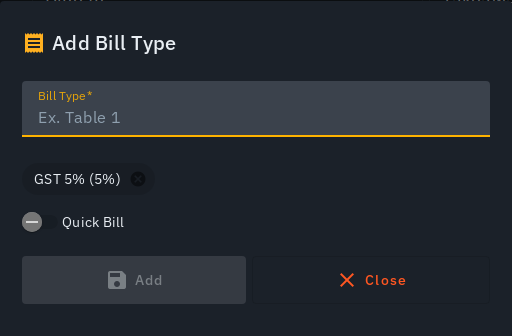
Each table/counter (e.g. "Dine In", "Takeaway") has its own list of which taxes/charges apply to it:
- Under Outlet › Tables & QR codes, tap New table/counter (or Update on a row).
- Set the table/counter's name.
- Use the Taxes & charges on this table field to search and add taxes/charges -- each shows up as a removable chip. New tables/counters start with whichever taxes/charges are marked Default; add or remove chips from there.
- Toggle Quick Bill on if this should be a one-tap quick-bill option.
- Tap Add (or Update) to save.
Tips
- A tax/charge has to exist in the catalog before it can be added to a table/counter -- add it under Taxes & Charges first.
- Deleting a tax/charge is blocked while any OPEN bill is still charging it -- settle or void those bills first. This protects a guest who was already quoted a total from having it silently change underneath them. The refusal names every blocking bill (table/counter, item count, amount) and updates itself LIVE as each one settles -- no need to close and reopen the sheet; Delete turns on by itself the moment the list reaches zero, and a Go to open bills button jumps straight to them.
- A card named What your bill prints at the foot of this page always shows the real receipt/invoice your current settings produce, with the same A4/80mm/58mm paper switcher.
- There's no per-table override for taxes/charges today -- they're set at the table/counter level only.
- On a bill with a GST-inclusive priced item, the billing screen's Subtotal row becomes Taxable value -- the tax-excluded figure the taxes are actually worked out on -- and every money figure on screen shows its exact paise instead of being rounded to the nearest rupee, matching what the printed tax invoice already showed.