 ILLER
ILLERHandling online orders (Swiggy & Zomato)
You can ring up a Swiggy or Zomato order in Biller as a normal bill, and have it counted separately as an Online order in your reports. The one thing that makes that happen is a specific field with a specific value -- so it's worth getting this exactly right.
Logging an online order
- On the Bills screen, open a new bill under whatever table/counter you normally use for these -- Dine In, Takeaway, or a dedicated "Swiggy" table/counter if you've set one up. (The table/counter you pick does not affect whether it counts as Online -- step 3 is what does that.)
- Add the ordered items just like any other bill -- search with Add Dish or tap items from Most Used Items.
- On the opened bill, in the Customer phone or email field, type the
word
SwiggyorZomato(instead of a phone number or email). Biller recognises these two exact words and lets you complete the bill without a real phone/email -- and this is what tags the order as Online. - Complete the bill as usual. See Making a bill.
It shows up in your insights
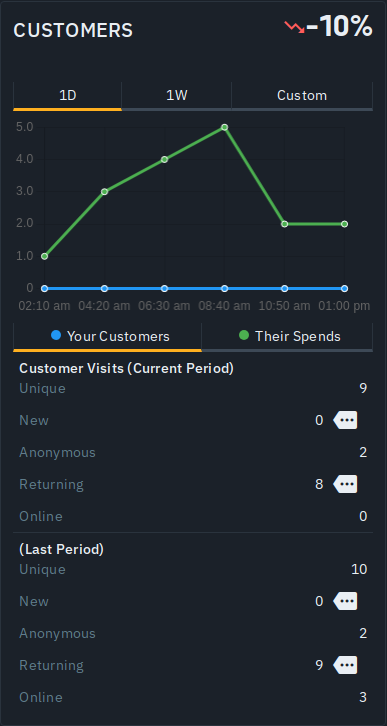
An order whose customer field is exactly Swiggy or Zomato is counted as
an Online customer on the Insights screen's Customers card, kept
separate from your walk-in and returning customers -- so you can see how much
of your business comes through these channels. See
AI insights.
Only "Swiggy" and "Zomato" are recognised
This is important: only the exact words Swiggy and Zomato are treated
as Online. Any other value in the customer field -- a different channel name,
a typo, or leaving it blank -- is not counted as Online; a bill with no
real customer detail simply shows as Anonymous in your reports. So if you
take orders through another platform, there's no built-in Online bucket for
it today -- it'll fall under Anonymous unless you record a real customer phone
or email.
What this is -- and isn't -- today
Being upfront so there are no surprises: typing Swiggy or Zomato is a way
to label an order you enter by hand. Biller does not connect to the
Swiggy or Zomato platforms today -- it does not pull orders in automatically,
push your menu out to them, or reconcile their payouts. You key the order in
yourself, the same as any other bill.
On the roadmap
Direct delivery-aggregator integration -- so online orders flow in without
re-keying -- is planned work rather than a shipped feature, tracked under
Biller's Delivery Aggregator Integrations initiative
(issue #249). Until
it lands, the manual, Swiggy/Zomato-labelled bill above is the supported
way to keep your online sales inside Biller.
Tips
- Type the customer value as exactly
SwiggyorZomatoevery time -- the Online count in Insights is matched on those two exact words and nothing else. - Everything else about the bill behaves normally: it goes to the kitchen ticket wall, can be printed or shared, and counts toward your sales.