 ILLER
ILLERAdd ingredients with AI
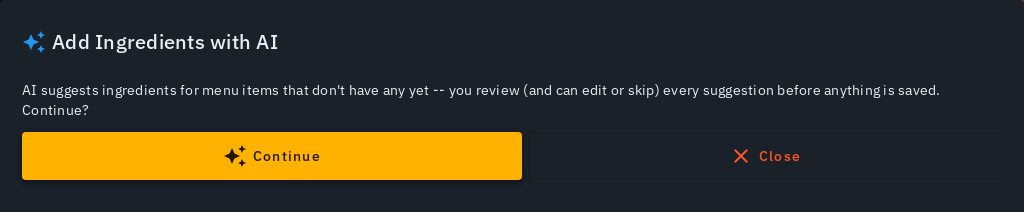
Once your menu is in, Biller can suggest the ingredients behind each dish with AI -- name, amount and unit -- so you don't have to type every recipe by hand. You review each suggestion before anything is saved, the same "nothing saved without your say-so" rule as the AI menu scan. Linking dishes to their ingredients is what turns on automatic stock deduction and low-stock alerts (see Inventory & stock).
This is a suggestion step you review, not an automatic recipe detector -- AI proposes a starting point and you have the final say.
Adding ingredients for your whole menu at once
- On Menu, admins see an Add Ingredients with AI button next to Upload Menu Photo. Tap it.
- A confirmation sheet explains what's about to happen -- AI will suggest ingredients (with typical amounts) for every menu item that doesn't have any linked yet. Tap Continue to start.
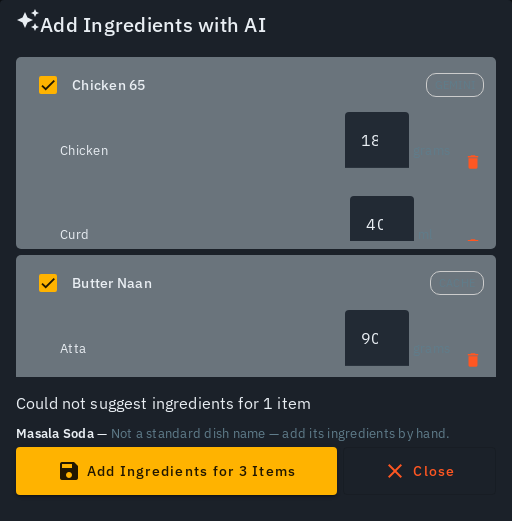
- AI works through your menu (in batches, for larger menus) and hands back a reviewable list: each dish shows its suggested ingredients (name, amount, unit) and a cache or gemini source badge -- cache means a similar dish elsewhere already taught the system this recipe (no AI call needed); gemini means it was freshly worked out for you.
- Review each dish: edit any amount that looks off, remove an individual ingredient with the bin icon next to it if it doesn't belong, or untick a dish to skip it entirely for now. (Removing every ingredient from a dish just unticks that dish.) A dish AI couldn't confidently suggest ingredients for is listed separately, with a reason -- it's never just silently dropped.

- Tap Add Ingredients for N Items to save. A progress bar shows the
percentage done and which dish is being saved right now (e.g. "Adding
ingredients for 'Dosa' (4 of 20)") -- for a big menu this can take a
while, and it keeps working on Biller's servers even if you close this
screen or your browser tab. You'll get a push notification when it's
done, so you don't need to keep watching the progress bar. When it
finishes you'll get a summary -- how many items were updated, how many
already had ingredients (left untouched), and how many new inventory
items were created. If saving failed for a particular dish, it's called
out by name so you can retry it individually later.
- If you navigate away or close the tab while it's still running, opening Menu again picks the SAME run back up and keeps showing its progress -- it's never lost, and it's never started twice.
Adding ingredients for a single item
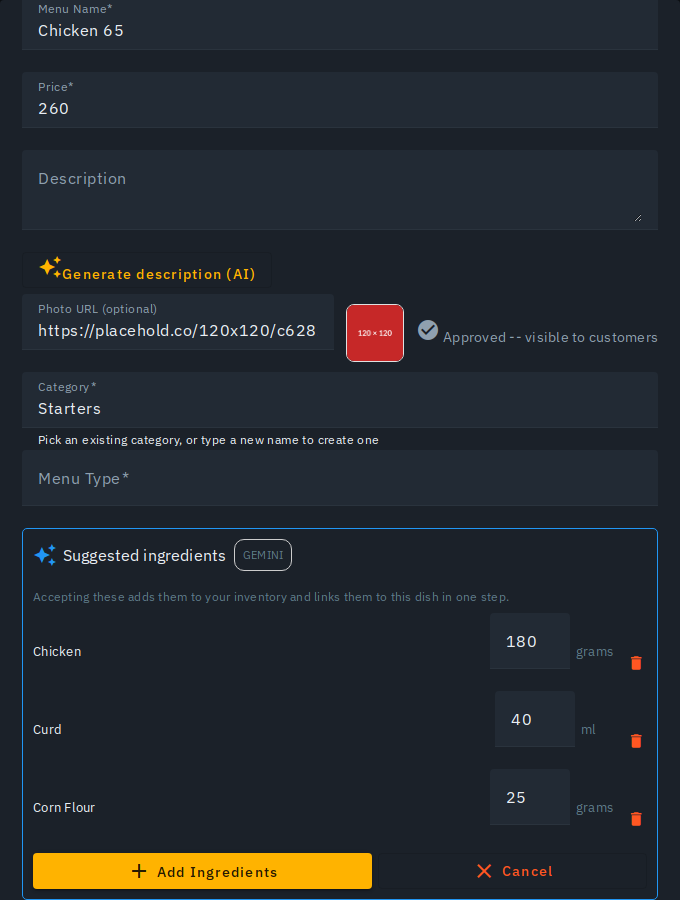
Editing one menu item that has no ingredients linked yet? Its edit form shows a Suggest ingredients (AI) button. Tapping it derives, and shows, a suggestion inline -- edit the amounts if needed, remove any suggestion that doesn't belong with the bin icon on its row, then Add Ingredients to save (or Cancel to discard the whole suggestion without saving anything).
Adding ingredients for a selection of items
Selected a few items on Menu (tick their checkboxes) and tapped bulk Update? That sheet also offers Add ingredients with AI -- the same confirm-then-review flow as the whole-menu version above, just scoped to exactly the items you selected instead of your entire menu.
Ingredients ARE inventory items
There aren't two separate lists to keep in step. A dish's ingredients are simply the inventory items that dish consumes, plus how much of each it uses per plate -- that's why the edit form calls the section Ingredients (inventory items used by this dish).
That means you never have to go and create an inventory item first: accepting an AI suggestion creates any missing inventory item and links it to the dish in the same tap. And before AI suggests anything, it is given the inventory you already stock, so it reuses those exact items instead of inventing near-duplicates (it will link "Atta" you already have rather than adding a separate "Wheat Flour").
Tips
- Ingredients AI creates that don't already exist in your inventory are added there automatically, starting at zero stock -- correct the actual on-hand amount from Inventory afterwards.
- Suggestions stick to what the dish name actually says. A plain Tawa Paratha gets flour and ghee, not potato -- only an Aloo Paratha gets potato. If a suggestion still looks wrong, remove that row before saving; your correction also teaches the system for next time.
- Asking for the same dish twice gives you the same answer: the first result is remembered, so a repeat suggestion is served from that instead of being worked out afresh. Two dishes that are genuinely different -- e.g. "Aloo Paratha (with ghee)" and "Aloo Paratha (without ghee)" -- are NOT treated as a repeat, even though most of the name matches; each gets its own fresh suggestion, so a modifier like "without ghee"/"no onion" never silently borrows another dish's ingredients.
- An item that already has ingredients linked is left alone -- adding ingredients is additive only, and never silently overwrites a recipe you (or a teammate) already set up.
- Spice ingredients are deliberately excluded -- those stay a manually tracked inventory item, not an AI-derived one.
- Suggested amounts use the natural small unit for a per-plate portion -- grams for a solid ingredient, millilitres for a liquid one (ghee, oil, milk) -- reserving kg/litre for a genuinely large amount (1000g/1000ml or more). You'll never see a small portion suggested as an awkward fraction of a kg or litre. A brand-new inventory item created from this flow keeps that same unit (grams, ml, kg or ltr) -- a small liquid stays "30 ml", it isn't silently rewritten to a decimal litre.