 ILLER
ILLERPrinting your bills
Biller prints the customer receipt as a proper thermal receipt, sized for the 80mm or 58mm paper roll your printer takes -- not a generic A4/Letter page.
Printing on a desktop, with a USB thermal printer
- Plug in your thermal printer and install it through your operating system's normal printer setup (the same driver install you'd do for any USB printer) -- Biller prints through your OS's print dialog, it doesn't talk to the printer directly.
- Open the bill's print page.
- Use the paper width toggle at the top of the page to match your printer's roll -- 80mm or 58mm. This changes the receipt's layout (column widths, QR code size, font size) so it fits the roll cleanly.
- Tap Print, then choose your thermal printer in the browser's print dialog.
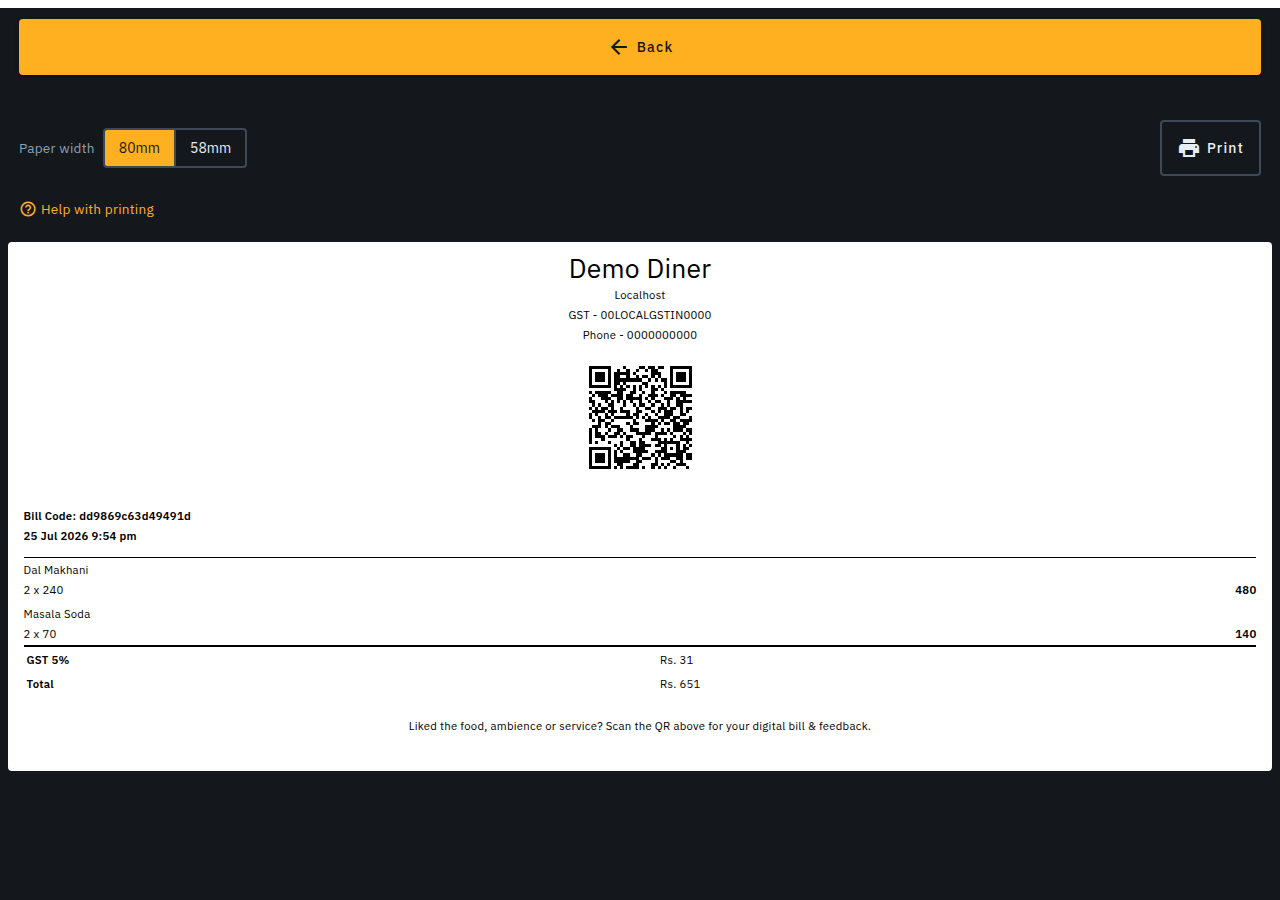
Your chosen paper width is remembered on this device, so you only need to set it once per printer.
Printing on a phone, with a Bluetooth/USB thermal printer
Biller's own native app doesn't print directly to a thermal printer from a phone yet. Until then, the simplest way to get a bill onto a phone-connected thermal printer is a companion app:
- Install RawBT (or a similar thermal-printer bridge app) from the Play Store, and pair/connect it to your Bluetooth or USB thermal printer following that app's own setup instructions.
- Open the bill's print page in your phone's browser, same as above.
- Set the paper width toggle to match your printer (58mm is common for small handheld/portable thermal printers).
- Tap Print. When your phone's share/print sheet opens, choose RawBT (or your chosen bridge app) instead of a system print service -- it takes the print job from there and sends it to your printer.
One-tap RawBT printing (Android browser)
If you're viewing the bill's print page in an Android phone's browser (Chrome or similar -- not the Biller native app), a Print via RawBT button appears next to the regular Print button. Tap it to send the receipt straight to RawBT -- no share sheet needed -- as long as RawBT is already installed and paired with your printer. If nothing happens after a couple of seconds, RawBT probably isn't installed yet: install it from the Play Store, pair it with your printer, then tap Print via RawBT again.
No printer handy? Other ways to get a bill to the customer
Printing is optional -- Biller can already get a bill to a customer without paper:
- SMS or email -- if you've captured the customer's phone number or email on the bill, Biller sends them a receipt link automatically as soon as you mark the bill Complete.
- QR code -- the Show QR sheet on a completed bill lets the customer scan it with their own phone to view (and forward) their bill, no printer involved.
- WhatsApp -- the Show QR sheet also has a Send on WhatsApp button so you can send the bill link straight to the customer's WhatsApp yourself (pre-addressed if you captured their phone number, otherwise it opens WhatsApp's own contact picker). From their own phone's bill view, a customer can also tap through to WhatsApp with their receipt link pre-filled, ready to forward or save.
These are handy as a paperless fallback, but they don't replace a printed receipt where your outlet needs one on hand (e.g. cash-drawer or compliance reasons) -- for that, use the desktop or phone printing steps above.
Automatic printing over your network
Biller can also print the customer receipt AND kitchen order tickets (KOT) automatically to a network (WiFi/LAN) thermal printer -- no browser print dialog, no manual tap needed. See Printers & printing setup for how to add one, choose its receipt/kitchen role, and test-print it. This printed receipt carries the same customer bill QR code as the on-screen "Show QR" sheet -- the customer can scan it to view their bill, same as a manually printed or RawBT receipt.
If you bump up the quantity of a dish that's already been sent to the kitchen (and tap Update to resend), Biller prints a follow-up ticket showing only the extra quantity -- e.g. +2 Paneer Tikka -- instead of reprinting the whole order, so the kitchen adds the right amount without double-cooking what's already in progress.
Kitchen tickets print large, bold table/item text designed to be read at a glance across a busy kitchen rail, with each item's menu category shown above it and a divider line between items so a multi-item ticket never blurs together. For a table running its own guest-ordered session, items from a later order round print under a Wave 2, Wave 3, etc. header so the kitchen can tell a fresh round apart from the table's earlier order.
Print from the cloud -- the printer companion app
If your outlet uses Biller's hosted (cloud) service, the server itself isn't on your restaurant's local network -- so it can't open a direct connection to a network printer's private IP address the way a self-hosted install can. The printer companion app bridges that gap: a small program you run on any always-on machine on your outlet's own network (a spare PC, laptop, or a Raspberry Pi) that connects out to Biller and relays print jobs to your printers locally. No inbound firewall rules or port-forwarding needed -- the connection is always outbound from your network to Biller.
- Go to Admin -> Printers & Peripherals. The Printer companion app panel at the top shows whether one is currently paired/connected.
- Tap Pair a new device to get a short-lived 6-digit code.
- On a machine on your outlet's network, install and open the printer companion app (see Install the printer companion) and type the code into its first screen.
- Leave it running -- it reconnects automatically if the network drops. The panel updates to online once it's connected.
Tap Revoke to unpair -- this immediately disconnects the companion app; pair a new device (or the same one again) to resume printing. This is entirely separate from -- and works alongside -- the direct network printing described above, which still applies unchanged for a self-hosted Biller install already on the same network as its printers.
What's not supported yet
- Direct in-app Bluetooth printing from Biller's native app: the groundwork for this (turning a bill into the raw printer commands a Bluetooth thermal printer understands) has been built and is under active testing, but it isn't connected to a real printer yet -- that needs an actual device to test against. Until it ships, use the RawBT companion-app steps above on a phone, or a USB-connected printer on a desktop.