 ILLER
ILLERThe kitchen ticket wall (KDS)
Biller's kitchen display is an on-screen wall, not a printout -- tickets appear automatically the moment a bill is sent to the kitchen, and update live as things change.
Two views: the kitchen board and the ticket wall
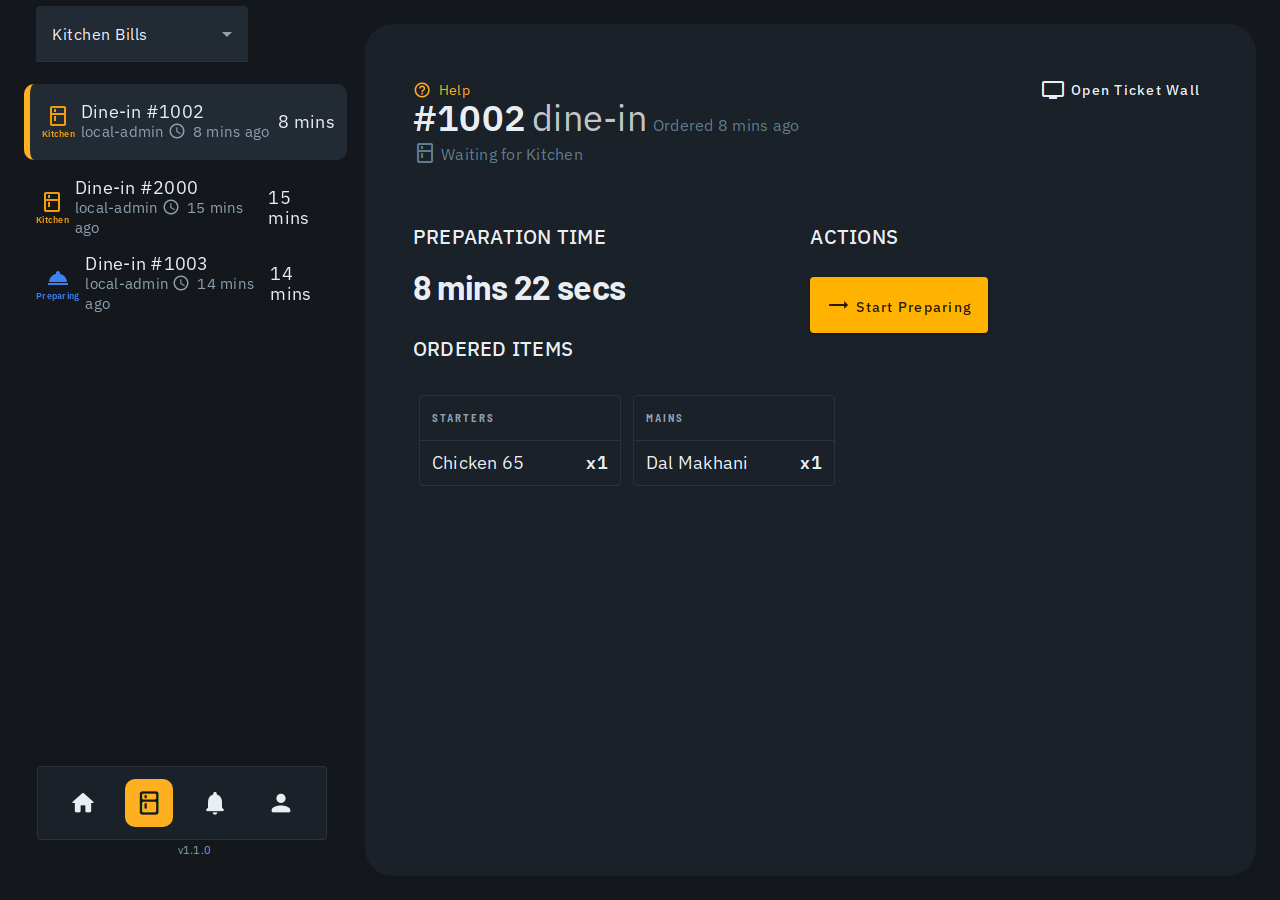
- Kitchen board (the everyday working view) shows one selected ticket at a time -- its ordered items grouped by category, a preparation timer, and the action button that advances it (see below).
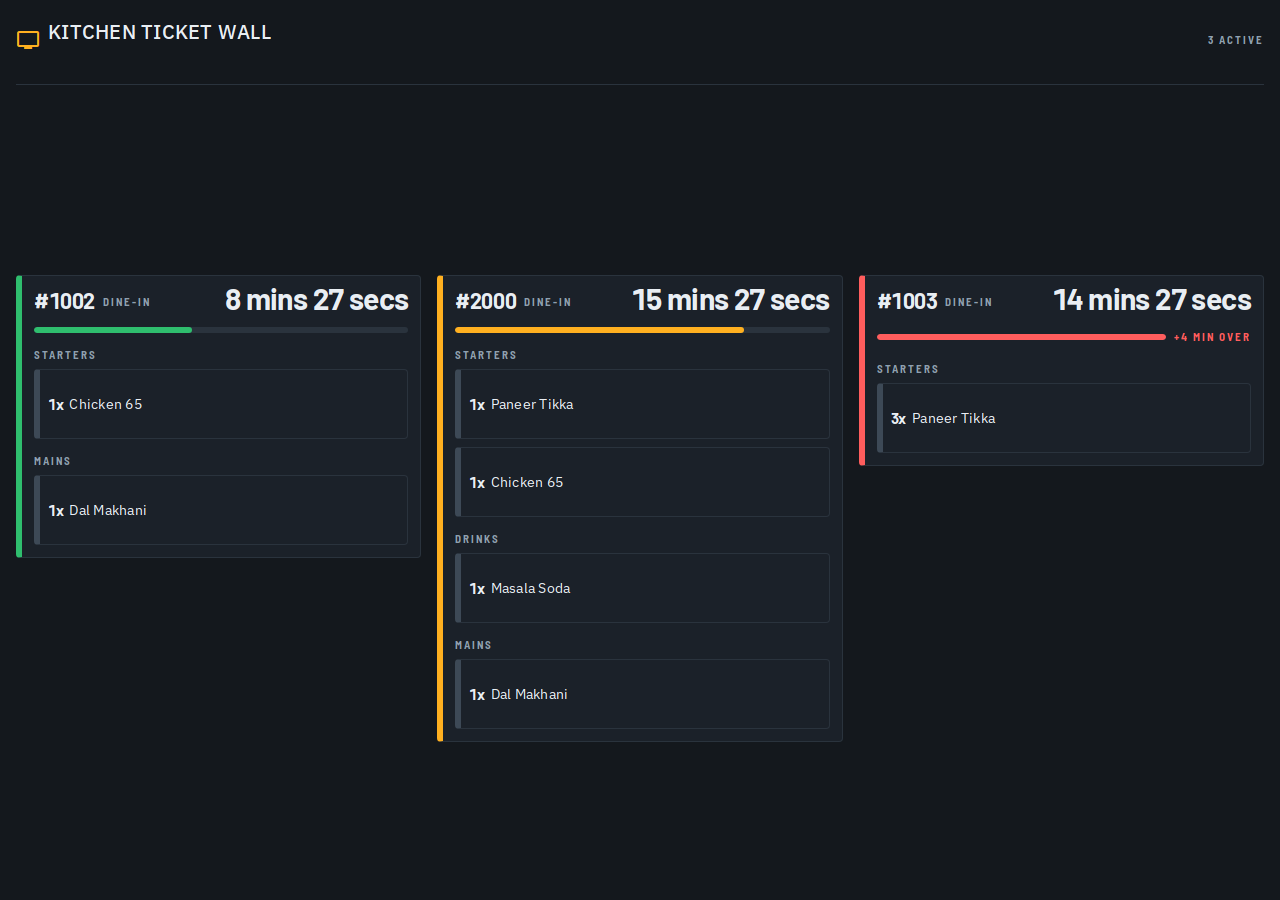
- Ticket wall ("wall mode") is a full-screen, read-only grid of every active kitchen ticket at once -- built for a mounted TV/display in the kitchen itself. Tap Open Ticket Wall on the kitchen board to open it in a new tab.
Reading a ticket
Each ticket on the wall shows its table/counter and number, the items ordered (grouped by category, with quantities), and how long it's been sitting:
- A colored age band -- green, then amber, then red -- escalates the longer a ticket sits uncompleted, with a progress bar and a "+N min over" count-up once it's run past its target prep time.
- A ticket that's been marked Ready switches to its own distinct Ready badge instead of continuing to escalate toward red -- a done order waiting for pickup doesn't read as a badly overdue one.
Cancelled items and per-item status
If a waiter or cashier cancels an item after it's already been sent to you (a void, no cost -- or a waste, once prep had already started), it does not disappear from the ticket. It stays on the ticket, struck through and greyed out, with a VOID or WASTE tag -- hover/tap the tag to see the reason they gave. This is deliberate: you should be able to see that an item was pulled and why, not wonder where it went.
If every item on a ticket ends up cancelled, the ticket shows "No items on this ticket" and its action button disables -- there's nothing left to advance.
On the kitchen board, each still-live item also shows a small colored status tag (sent / preparing / ready) matching the same colors used elsewhere for bill stages. Older tickets from before this feature don't show this tag at all -- that's expected, not a bug.
Marking a ticket ready
The ticket wall itself is display-only -- there's no tap-to-advance action on it. To move a ticket forward, use the kitchen board: select the ticket and tap its action button (Start Preparing, then Mark Ready, then handed off to the waiter/cashier to mark Delivered from the Bills screen). The action button is a large, full-width tap zone -- built to be easy to hit with a gloved or wet hand at a busy pass, not a small precise button you have to aim for.
Tips
- The wall refreshes live over the same real-time connection as the rest of the app -- no manual refresh needed when a ticket is marked ready or a new one comes in.
- There's no automatic kitchen printer (KOT) support yet -- the ticket wall is today's stand-in for a printed kitchen ticket. See the Printing your bills help article for what printing does support today.
- The wall is meant to be left open on a dedicated screen in the kitchen -- it deliberately has none of the app's usual side-bar/header chrome. See the Setting up a kitchen display help article for getting it open (and staying open) on a mounted TV or tablet.