From Signup to Your First Bill in 10 Minutes on Biller
Published
Most restaurant owners put off switching POS systems because they assume setup means a lost afternoon, or a paid onboarding call. Here's exactly what it takes to go from signing up to printing your first real bill on Biller.app — realistically, about ten minutes.
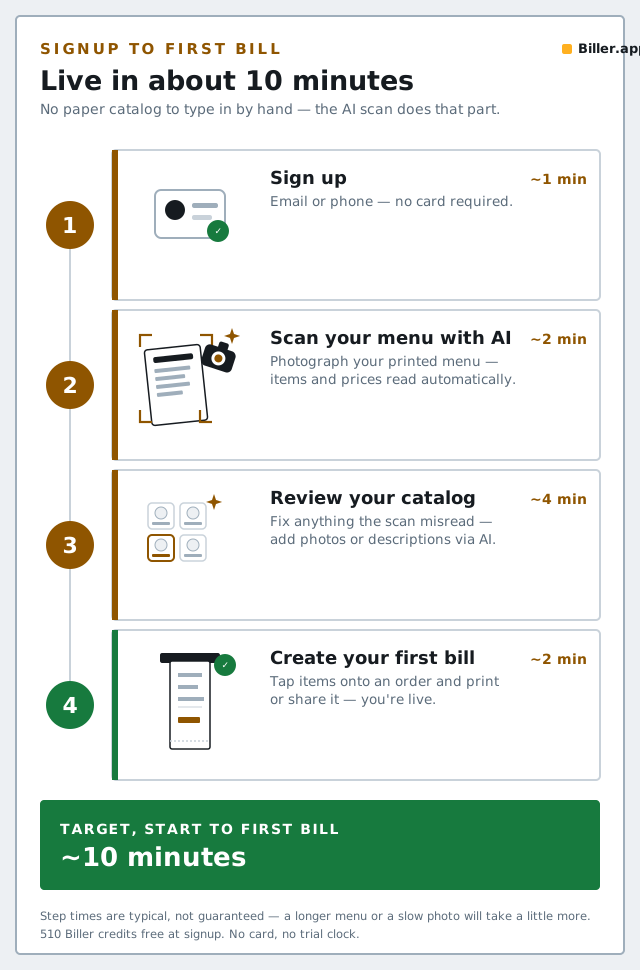
The 10-minute path
StepWhat you doRoughly how long 1Sign up — no credit card required for the free tier1 minute 2Enter your outlet's basic details (name, address, GST details if registered)2 minutes 3Add your menu — photograph your printed menu and let AI build the catalog2–4 minutes 4Review the AI-scanned items and fix anything it misread2 minutes 5Set up your tables (optional, if you want table-QR ordering from day one)1–2 minutes 6Ring up your first billunder 1 minuteBefore you start: what to have ready
- Your printed menu — a phone photo or a PDF, whichever you have handy.
- Your GSTIN, if you're GST-registered, so invoices are correct from bill one.
- A rough table list, if you plan to use table-QR ordering — you can always add or rename tables later.
What "day one" actually looks like
- Sign up. 510 Biller credits land immediately, free — no card, no trial clock, and credits never expire.
- Scan your menu. This is normally the slowest step in switching software, and it's the one AI menu scanning is built to shrink — see the full menu-digitization guide for tips on getting a clean first scan.
- Review, don't blindly trust. Give the scanned catalog one pass — check prices and categories, especially on multi-price or handwritten items.
- Fill any gaps with AI-generated photos and descriptions for dishes that don't have them yet.
- Print your first bill. GST is applied automatically if you've entered your details, and the bill format is ready to hand to a customer immediately.
What to set up next (not day one, but soon)
- Table-QR ordering, once your menu is confirmed accurate — see our setup guide.
- Kitchen wall / KOT routing, if you have a separate kitchen display or printer.
- Inventory and insights, once you have a few days of real billing data to look at.
Bottom line
The honest version of "quick setup" isn't a marketing claim — it's a menu scan, a review pass, and a first bill. If any of those steps takes you materially longer than ten minutes, that's worth telling us directly rather than assuming it's just how restaurant software works.