Table-QR Ordering for Restaurants: How It Works and How to Set It Up
Published
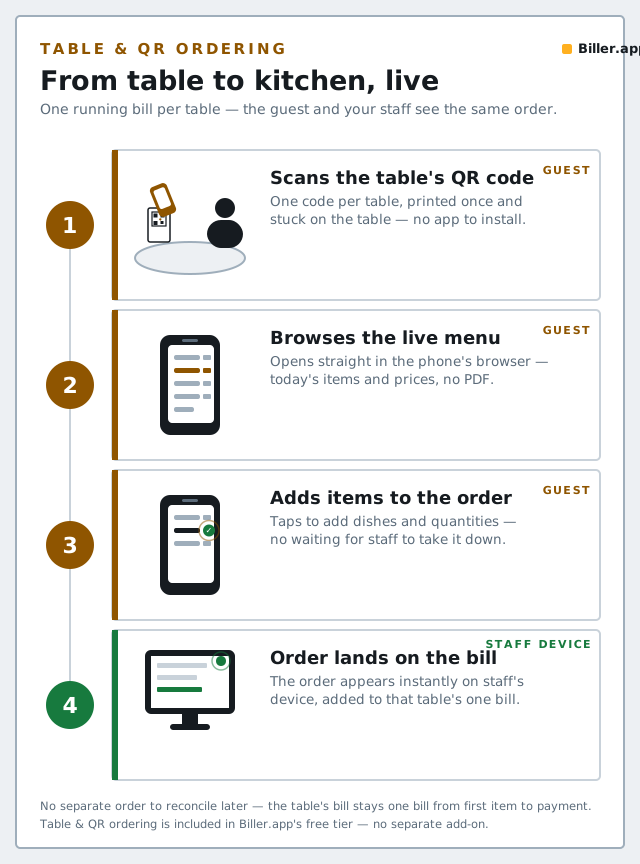
Table-QR ordering lets a guest scan a code at their table, browse your live menu on their own phone, and place an order that lands directly on the same bill your staff is already running — no app to download, no separate system to reconcile at the end of the meal.
How it works, end to end
- Each table gets its own unique QR code, generated from your POS.
- A guest scans it with their phone's camera — it opens straight in the browser, no app install required.
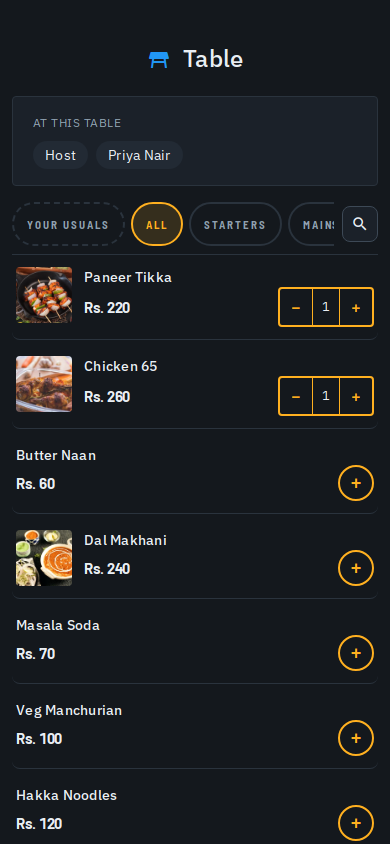
- They browse your live menu, including any AI-generated photos and descriptions, and add items.
- Their order lands in the same bill your staff is already running for that table — not a separate order stream someone has to manually merge in later.
- Kitchen tickets are generated the same way as any other order, appearing on the live kitchen wall for prep.
Why it's worth setting up, even for a small outlet
- Fewer order-taking round trips for waitstaff, especially useful during a rush.
- Fewer mis-heard or mis-written orders — the guest is typing the order themselves off the actual menu.
- Menu photos and descriptions do quiet upselling — a guest browsing on their own phone reads a dish description they'd never have asked a busy waiter to recite.
- No separate reconciliation at the end of the meal, because it's the same bill, not a parallel order channel.
Setting it up
- Make sure your menu is published and up to date first — table-QR ordering is only as good as the catalog behind it (see our guide on digitizing your menu with AI if you haven't set that up yet).
- Generate a QR code per table from your admin panel.
- Print and place each code where it's clearly visible and easy to scan — table tents or laminated cards both work well.
- Do one test order per table before opening it up to guests, so you catch any menu gaps before a real guest does.
- Brief your staff: table-QR orders still need a human eye — someone should still notice when an order comes in, the same way they'd notice a hand-written KOT.
Common questions
Can more than one guest at the same table order separately?
Yes — since it's the same live bill for the table, multiple phones scanning the same table's code all add to that one running order, the same as multiple guests calling out items to one waiter.
Does this replace waitstaff?
No — it removes repetitive order-taking trips, not the human presence guests still expect at a table. Staff stay in the loop for questions, recommendations and service.
What if a guest doesn't want to use their phone?
Table-QR ordering is an additional channel, not a replacement — staff can still take an order the traditional way for any guest who prefers it.