Purchase Orders for Restaurant Suppliers: From Reorder List to WhatsApp in One Tap
Published
Ask most restaurant owners how they reorder stock and the honest answer is a WhatsApp message typed from memory, or a phone call made while half-remembering last week's price. It works, until it doesn't — an item gets forgotten, a price goes unnoticed, or nobody can find the message from three weeks ago to check what was actually ordered. Biller.app's new supplier book and purchase-order flow turns that same weekly reorder list into a reviewed order sent from inside the app, with a permanent record kept.
Where this fits: the reorder list you already have
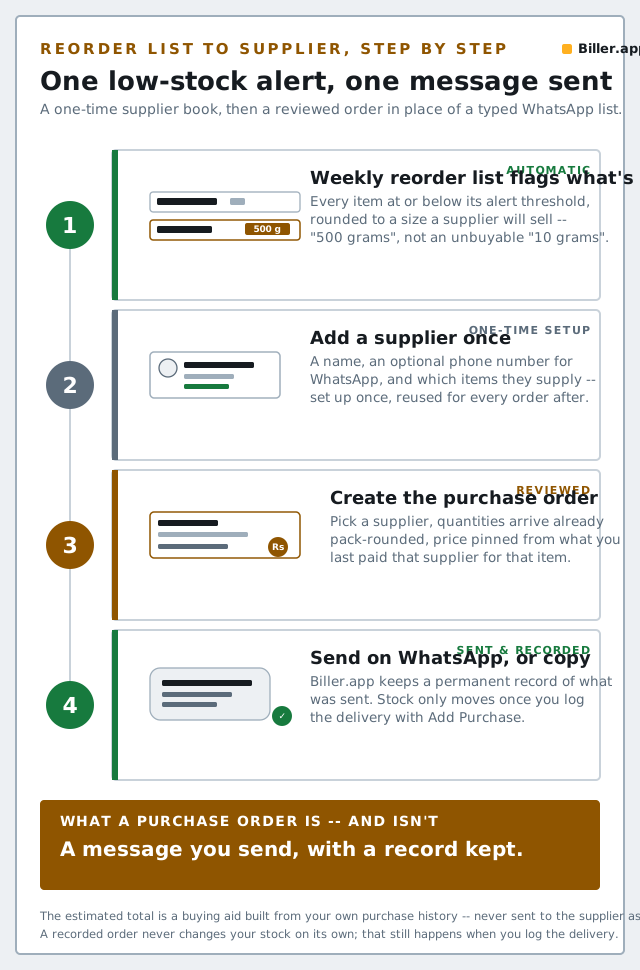
Biller.app's Inventory screen already builds a weekly reorder list — every item at or below its low-stock alert, rounded up to a size a supplier will actually sell you (you see "500 grams", not an unbuyable "10 grams"). Until now, the only thing you could do with that list was copy it as plain text and paste it into a chat yourself. The new Purchase order action turns the same list into a real order for one of your suppliers, without leaving the app.
Step by step
- Add a supplier, once. On the Inventory screen's Suppliers tab, tap Add supplier and record a name, an optional phone number (this is what lets Biller.app open WhatsApp addressed straight to them), and which inventory items they supply. Write the name exactly as you type it on purchases — that's how Biller.app finds what you last paid them.
- Open the reorder list and tap Purchase order. From Reports → Weekly reorder list, tap Purchase order to start a draft from the same pack-rounded quantities you already see there.
- Pick a supplier and review the quantities. Selecting a supplier narrows the list to the items they're known to supply (you can still show everything if needed), with each quantity already rounded to a buyable pack size — adjust anything before you commit.
- Create the order. Biller.app records it server-side: the supplier's name and phone, every item, the quantities, and the price per unit you last paid that supplier for that item.
- Send it. Tap Send on WhatsApp to open a pre-filled message addressed to the supplier's number, or Copy to paste it anywhere else.
Two things worth knowing before you rely on it
- The estimated total is a buying aid, not an offer. It's built from what you last paid that supplier — useful for you to sanity-check the order before sending, but it is never sent to the supplier as part of the message. The message itself asks them to confirm availability and price, so a stale figure on your end can never read as a commitment you've made. Any item you've never bought from that particular supplier shows "No past price" and is simply left out of the estimate.
- A recorded order is a snapshot, not a live sync. Once created, it never changes — not if prices move later, not if you rename an item, not if you edit the supplier's details. And it does not touch your stock count. Stock still only moves the way it always has: when the delivery actually arrives and you log it with Add Purchase.
Every order you've sent stays listed under Purchase orders sent on the Suppliers tab, with a Send again button if you ever need to re-share the exact same message — useful for a supplier who says they never got it, or a repeat weekly order.
What this doesn't do (yet)
Worth being upfront about the edges, the same way we are in our inventory automation guide: a purchase order in Biller.app is a message you send, not a live integration with your supplier's own system. There's no supplier catalogue or live pricing to browse, no marketplace to order from, and no order confirmation, delivery tracking or "receive against this order" step yet — when stock arrives, you still log it as a purchase the same way you always have. What's new is having a reviewed, price-aware order ready in one tap instead of typing a list from memory every week.
Bottom line
The weekly reorder list already told you what's running low. The supplier book and purchase-order sheet close the last manual step — turning that list into a specific, priced order for a specific supplier, sent the way you'd send it anyway, with a record you can always find again. It's admin-only, like the rest of Inventory, and it's live now on Biller.app at no extra cost.