Automatic Inventory Management for Restaurants: How Biller.app Turns a Menu Scan Into Live Stock Tracking
Published
Every restaurant owner learns the same lesson eventually: your stock count is only ever as accurate as the last person who bothered to update it, and by the time someone gets around to typing quantities into a spreadsheet, half of it is already guessed. Recipe-level inventory — knowing that one Paneer Tikka takes 150g of paneer, and having that come off your stock automatically the moment it sells — is the feature that actually closes that gap. Here's what it takes to get there, what a few other platforms require, and exactly what's automatic (and what still isn't) on Biller.app.
Why restaurant inventory usually breaks down
Most restaurants start inventory tracking the same way: a notebook, then a spreadsheet, then eventually a POS module — and at every stage, someone has to sit down and type in every dish's recipe by hand before any of it means anything. That setup tax is real. One recipe-costing guide puts it plainly: "every menu item needs a digital recipe inside the POS that lists each ingredient and quantity, down to the ounce," and that "initial data entry can be labor-intensive for restaurants with large menus." Skip a dish, mistype a quantity, or never get around to it at all, and your "inventory system" quietly stops reflecting reality — while still looking like it's working.
How other POS platforms handle recipe-level inventory
Recipe-based auto-deduction itself is not new — Petpooja, Restroworks (formerly Posist), Square and TouchBistro all deduct ingredient stock automatically once a recipe exists. The part that's usually still manual, everywhere, is getting that recipe into the system in the first place.
PlatformAuto-deducts stock on sale?Ingredients created from your menu automatically?Purchase orders / supplier mgmtLow-stock alerts PetpoojaYes, once a recipe card exists (a linked butter chicken deducts its chicken, cream and oil automatically)No — recipe cards are built manually, dish by dishYes — purchase manager, multi-supplier price viewYes Restroworks (Posist)Yes, per recipeNo — recipes are configured manuallyYes — centralized across locationsYes Square for RestaurantsYes, via Square Recipes (or the deeper MarketMan integration, a paid add-on)No — you build each recipe; MarketMan tier is an extra $99/mo/locationVia MarketMan integration onlyYes TouchBistroYes, on the Ingredient-Based Inventory add-on (updates roughly every 15 min)No — ingredients and recipes are entered manuallyNot a core featureYes Biller.appYes — zero extra taps, rides on the same "Complete" action staff already usePartially — AI infers ingredient name/quantity/unit per dish so you're not typing a recipe from scratch, but it's a separate reviewed step from the menu scan, and new inventory items start with an AI-estimated stock count (clearly badged) rather than a confirmed oneYes — a supplier book + one-tap purchase orders (WhatsApp/copy); no receive-against-PO step yetYesThat's the honest state of the market: nobody hands you a fully populated recipe book. Where Biller.app is different is in how much of the recipe itself gets filled in for you — AI reads your dish names and proposes ingredients, quantities and units, instead of you looking up "how much oil does a Chicken 65 use" and typing it in by hand for every item on the menu.
How it actually works on Biller.app
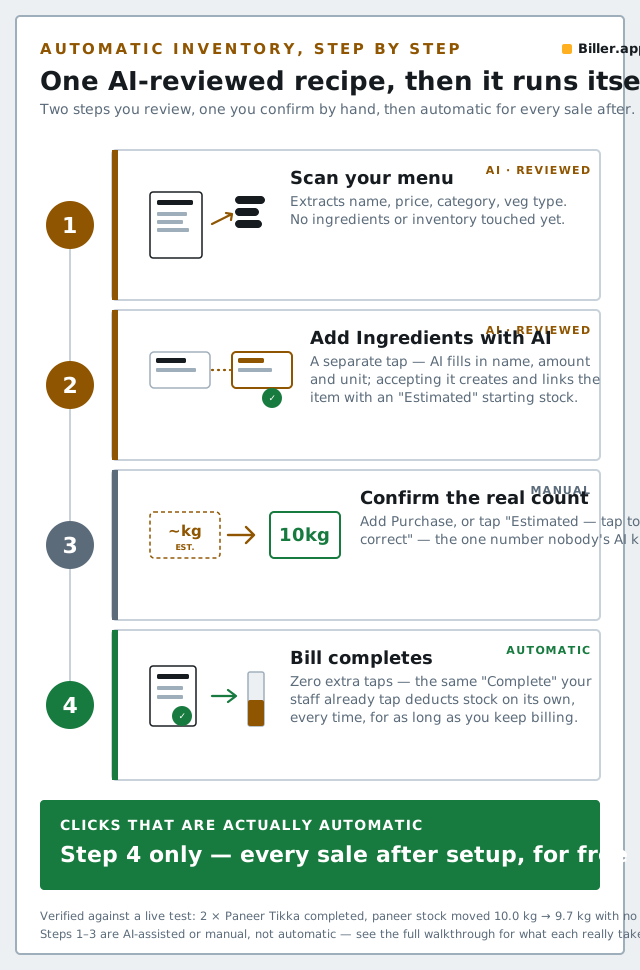
The pitch worth being precise about: it is not "scan your menu and your inventory is done." It's two separate, AI-assisted steps you review, followed by one manual step to confirm real stock numbers, followed by fully automatic deduction forever after. Here's the real chain:
1. Scan your menu — this creates dishes, not ingredients
Upload Photo → add pages → review → Save. This step reads a photo of your printed menu and extracts each dish's name, price, category and veg/non-veg type. It does not touch ingredients or inventory at all — the service that runs this step is explicitly "extract-only" in the code, by design, so a bad OCR read can never silently write into your stock.
2. Add Ingredients with AI — a separate, reviewed step
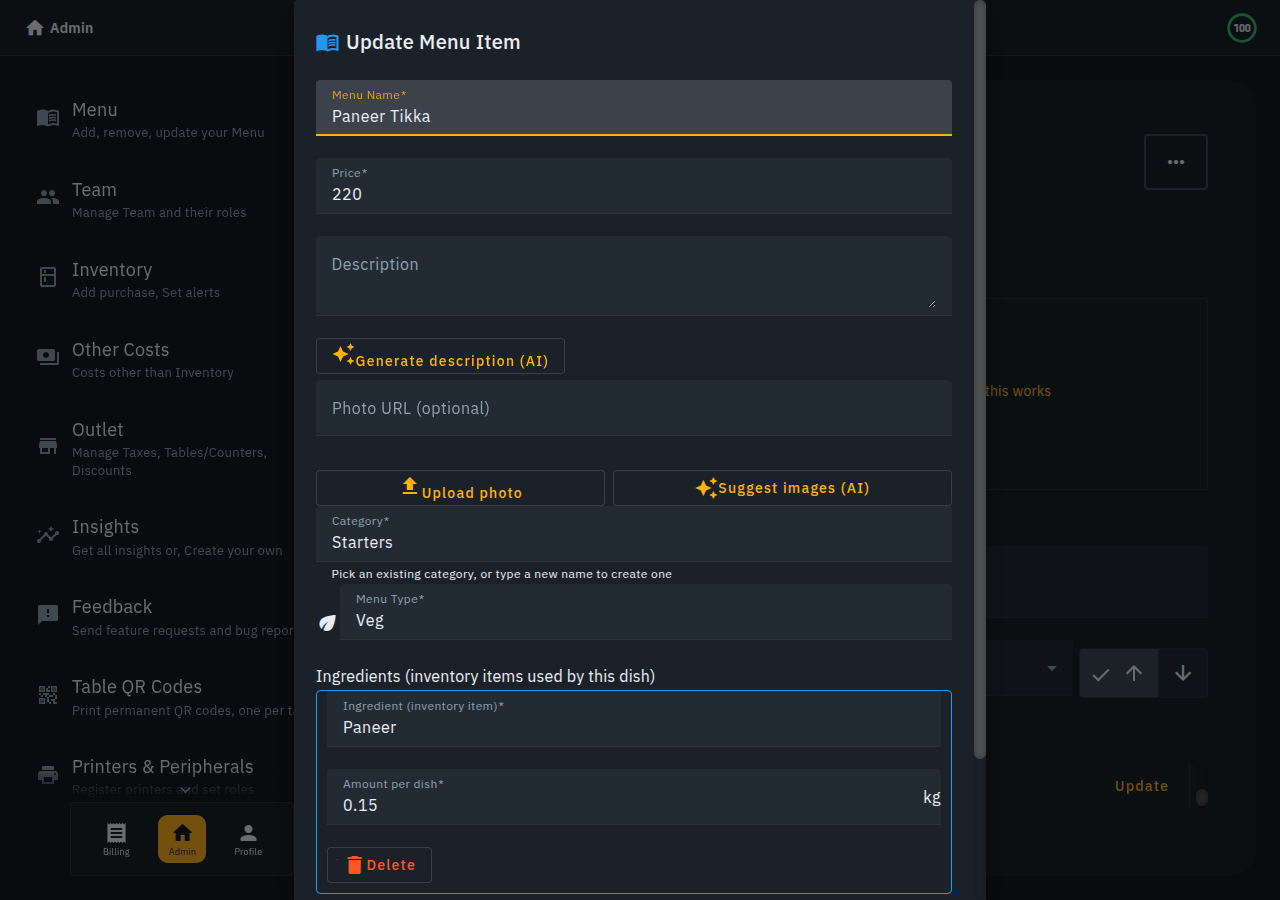
On the Menu screen, a second button — Add Ingredients with AI — is what actually builds the recipe side. Tap it, confirm, and AI proposes each dish's ingredients with a name, an amount and a unit already filled in (you're not typing "150g paneer" yourself — that's inferred). You review the list, edit or remove anything that looks off, then save. Accepting a suggestion does two things in one tap: it creates the inventory item if it doesn't already exist, and links it to the dish — there's no separate "go create the inventory item first" step.
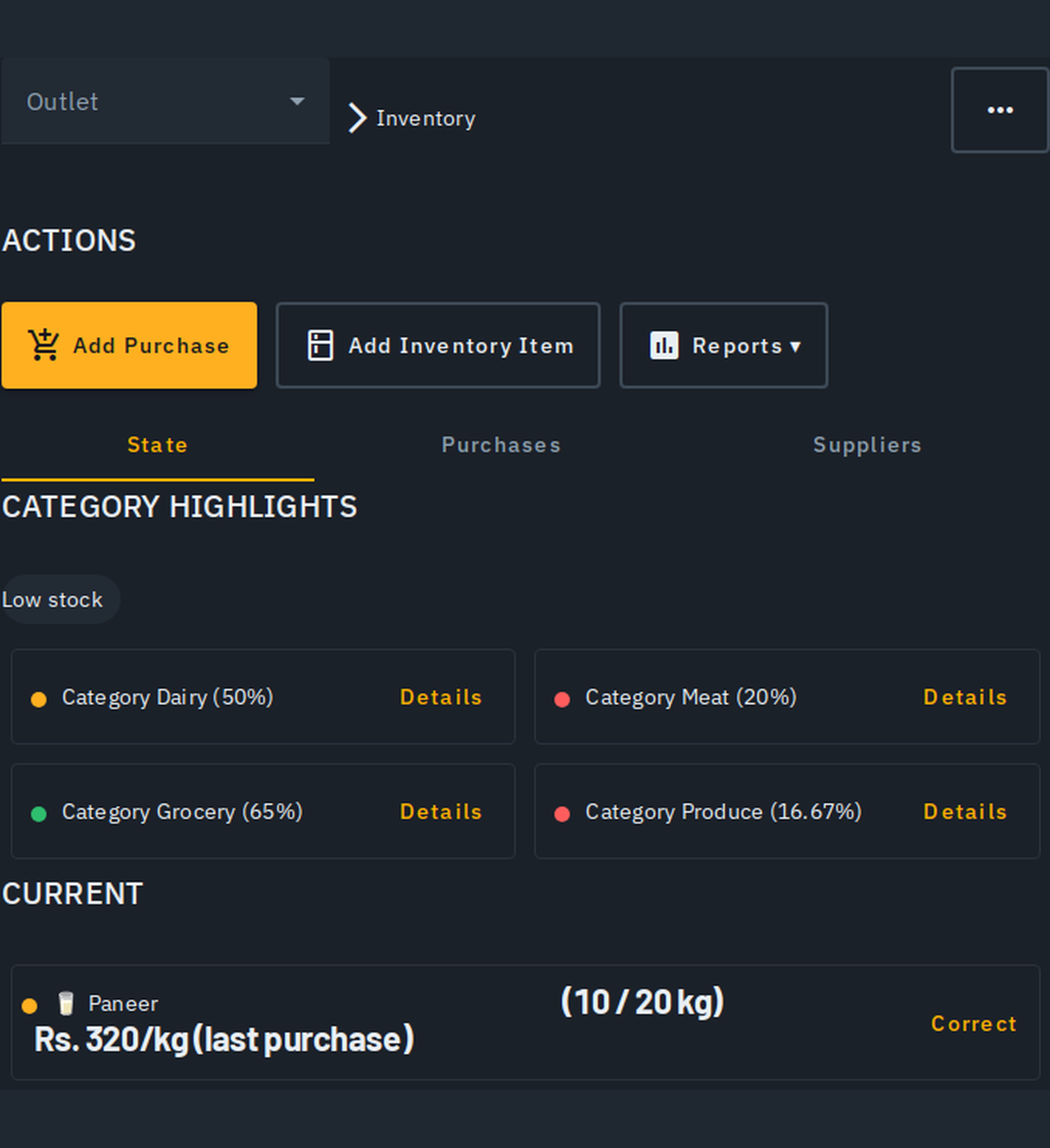
One honest caveat worth stating plainly: ingredients created this way start with a clamped, AI-guessed estimated amount, not a confirmed one — you'll see it marked "Estimated — tap to correct" right on the item, because the AI can infer that a recipe uses paneer, not how much paneer you actually have in the fridge right now.
3. Confirm the real count — the one step that stays manual
To turn an AI-guessed estimate into a real, trustworthy count, you either log a purchase — Add Purchase → Purchase Date, Item, Vendor, Units, Price → Save — or tap the "Estimated — tap to correct" badge and enter what's actually on the shelf. This is genuinely manual, and it's the one place the "AI does it for you" story needs an asterisk: the AI's starting number is a clamped, non-zero guess meant to get you closer than a blank zero, not a substitute for you telling Biller.app what's really there. Either action — a purchase or a correction — clears the estimate badge for good.
4. Sell it — stock drops with zero extra taps
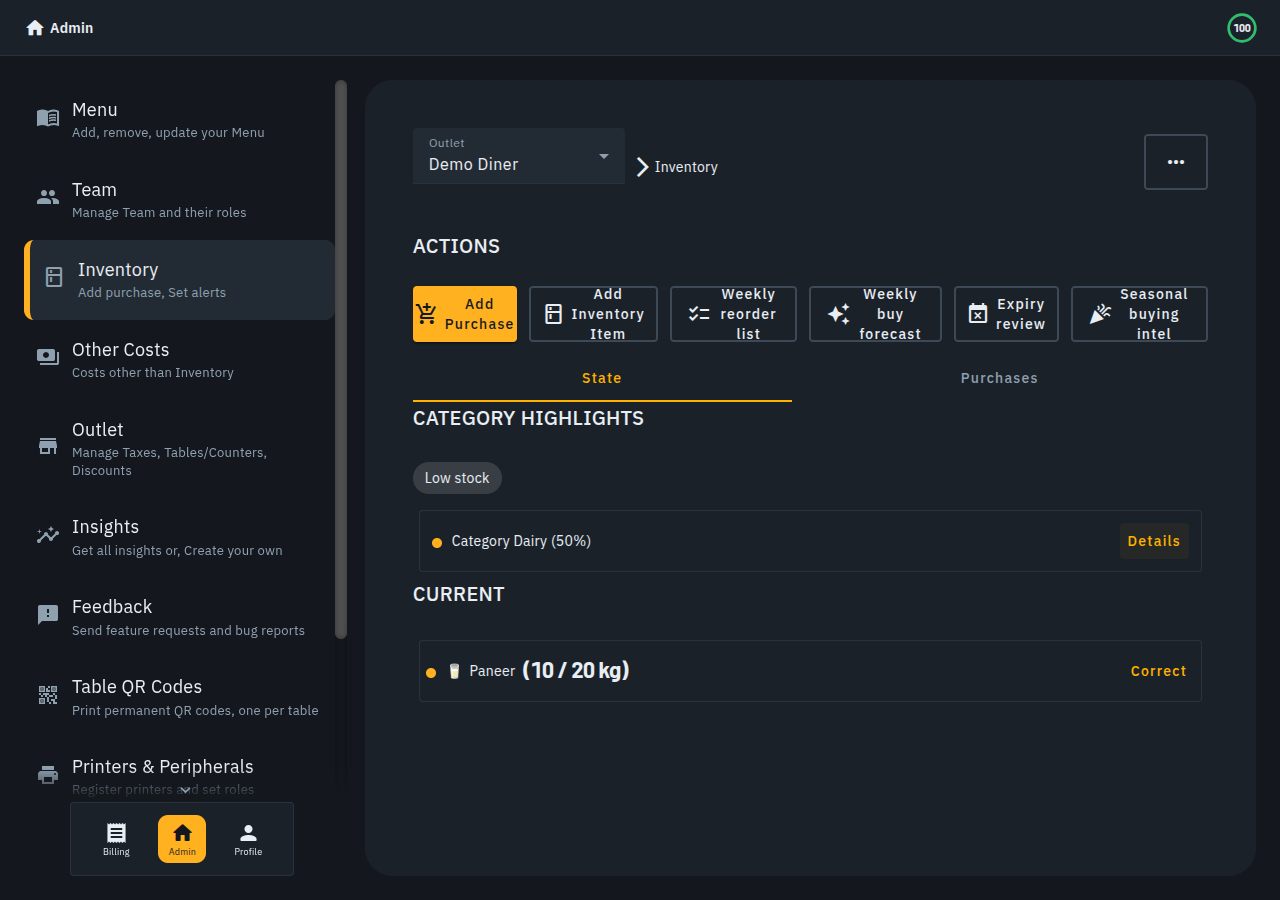
This is the step that's genuinely, fully automatic, and it's the one that matters most day to day. Once a dish is linked to its ingredients, completing a bill automatically subtracts what was used — no separate "sync inventory" button, no extra tap for staff. We tested this end to end: an order for 2× Paneer Tikka (0.15 kg paneer each, 0.3 kg total) was created, sent to the kitchen, marked delivered, and completed at the register — and the paneer count went from 10.0 kg to 9.7 kg automatically, the instant the bill was marked complete.
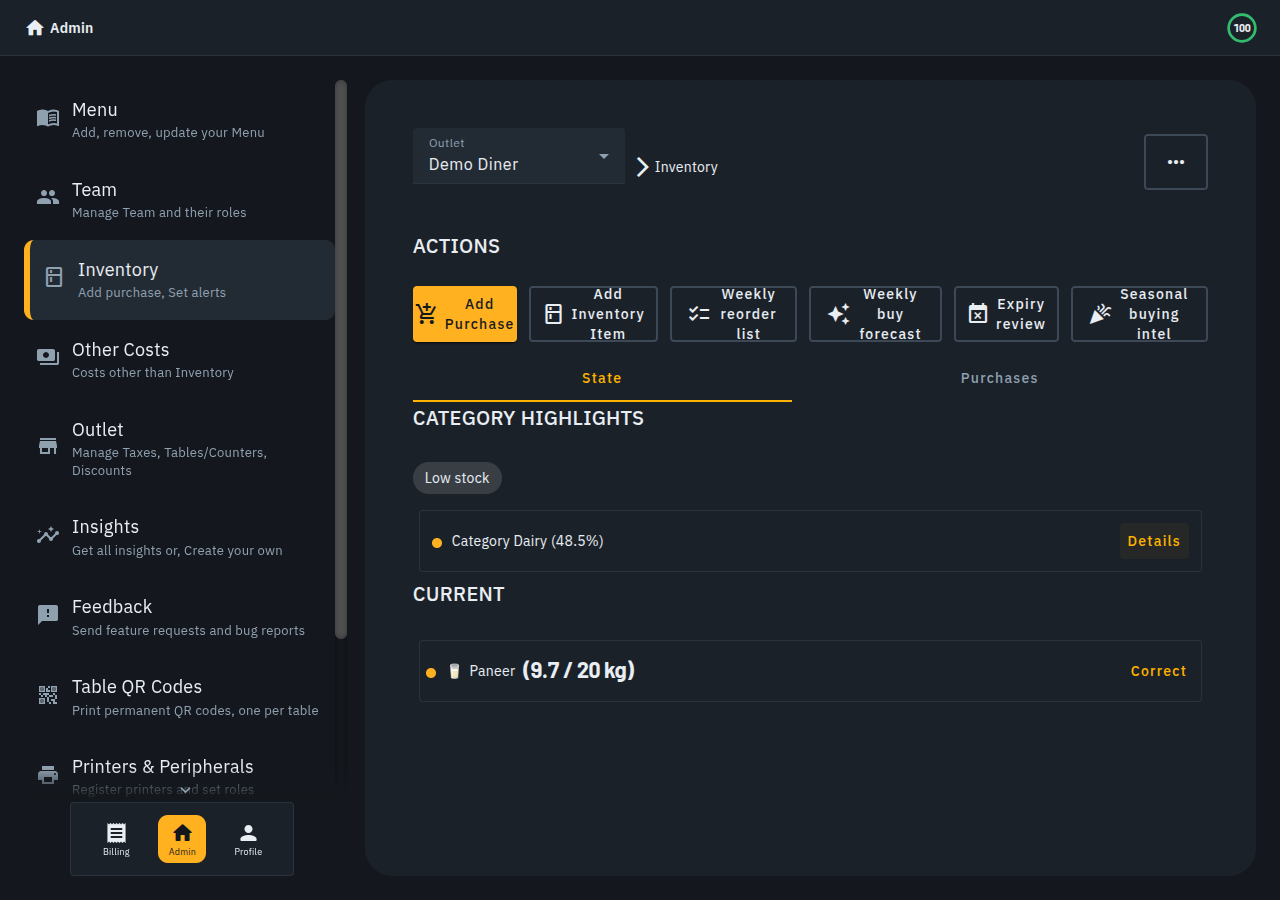
A couple of details that matter if you rely on this: it uses the delivered quantity as the multiplier when that's recorded and lower than what was ordered (so an under-delivered order only deducts what actually went out), the deduction is idempotent (a bill is never double-deducted even if it's reopened or reloaded), and cancelling a completed bill restores the exact amount that was taken off. When a linked ingredient hits zero, any dish that needs it is automatically marked Out of Stock — re-enabling it is deliberately left to a human, so Biller.app never silently assumes you've restocked.
What's still manual, on purpose
- Two AI steps, not one. Menu scanning and ingredient suggestion are separate, both human-reviewed by design — nothing saves without your say-so at either step.
- The first CONFIRMED stock number is always typed in by a human, via Add Purchase or a manual Correct — AI can propose a starting estimate, but it can't see your fridge.
- Spice ingredients are deliberately excluded from AI suggestions and stay a manually tracked item.
- Purchase orders are a message, not a live sync. The supplier book and one-tap purchase-order flow (WhatsApp/copy) are live — see our purchase-order guide — but there's still no supplier catalogue, live pricing, or "receive against this order" step; stock only moves when you log the delivery as a purchase.
- No wastage log beyond expiry write-offs — spoilage unrelated to shelf life is handled with a manual stock correction.
- No unit conversion across families — a recipe amount and its inventory item must share the same kind of unit (mass with mass, volume with volume); Biller.app will convert grams to kilograms for you, but it won't invent a kg-to-ml conversion, because that needs a density figure nobody has entered.
The bottom line
Nobody in this category — Biller.app included — has actually made restaurant inventory "zero-click." What's real, and what genuinely differs between platforms, is how much of the tedious part gets done for you before a human has to step in, and how much stays automatic afterward without anyone thinking about it again. On Biller.app: AI writes the recipe and proposes a starting estimate, you approve the recipe and confirm the real count in one review pass each, and every sale after that adjusts your counts on its own — for as long as you keep billing through the app.