Cafe Billing Software: Running a Counter and a Kitchen Off One Screen
Published
A cafe counter has to record the order, send food to the kitchen and take payment without losing track of the bill. Biller.app brings those actions into a billing flow, with clear steps that staff still need to perform.
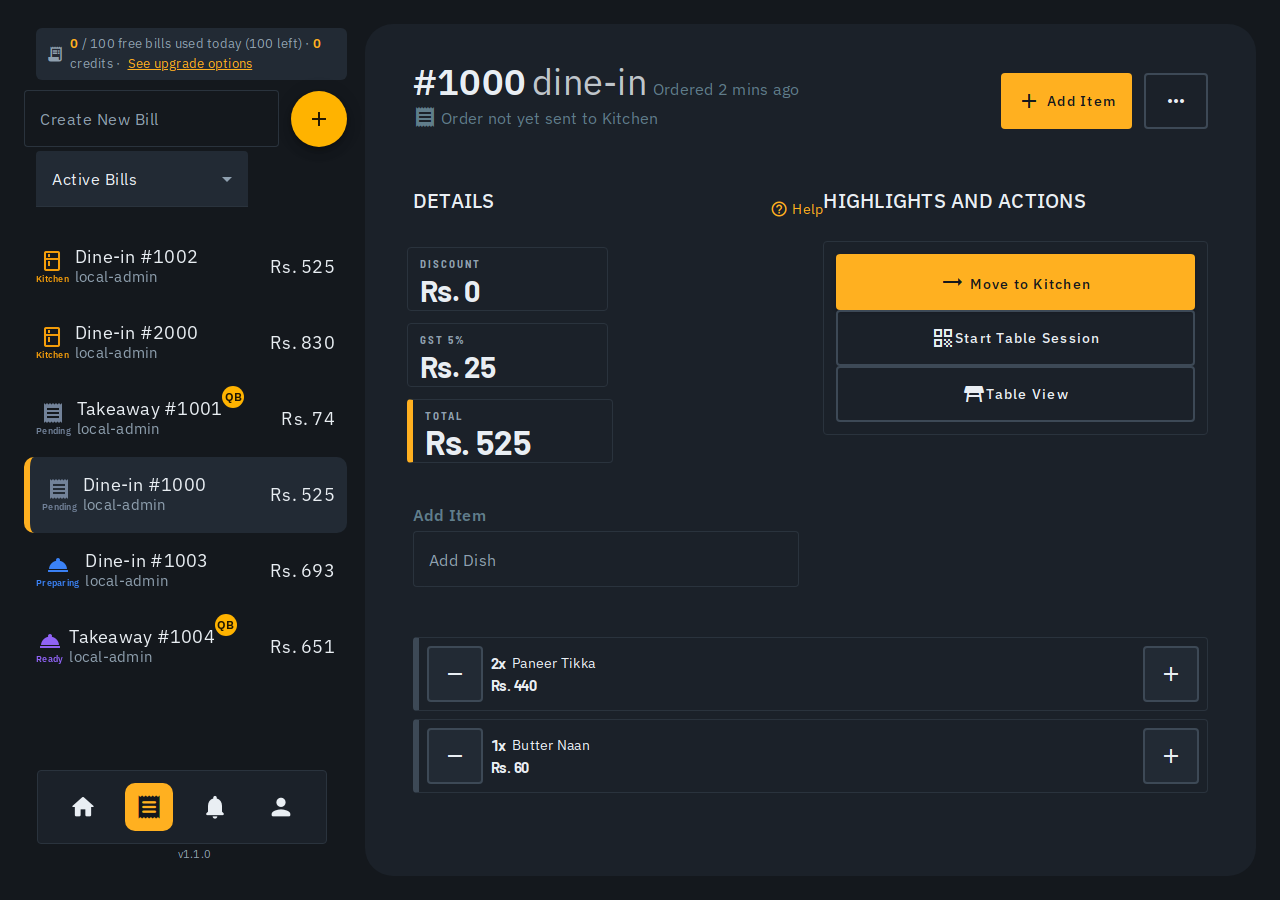
What does one billing flow cover for a cafe?
The making-a-bill guide covers a typical Quick Bill counter, from opening a bill to sharing the receipt. The same flow includes sending an order to the kitchen. Running the counter and kitchen off one screen means working through those actions; it does not mean every action happens automatically.
Picture an order for coffee and a sandwich. You add the dishes, check the quantities, send the kitchen ticket, then finish the bill with the chosen tender. Staff need to know where the order stands before telling a guest that preparation has begun.
The guide directs readers to the in-app help assistant for full detail on staged Advanced tables, item notes and cancellations. Keep this article's scope in mind when comparing software. It explains the documented Quick Bill flow rather than promising every possible cafe service pattern.
Use the making a bill help guide alongside a practice order. Let the person who works the counter follow the steps. A feature list is less useful than seeing how that person handles an extra dish or a printer problem.
How do staff start an order and find dishes?
Open the Tables screen, tap a table or counter and confirm Start bill. Tap anywhere on a dish's row to add one. Tap again for another unit. Once added, the row shows a running count and a round minus button to remove one.
For two coffees and one sandwich, the count badge helps the cashier check the order before sending it. Category chips and Search dishes and categories help locate dishes. On a phone, search starts behind an icon to leave more space for the dish grid.
Each dish row has a thin colour edge: green for veg, yellow for egg and red for non-veg. These are the labels documented for this screen. Staff should still check the actual dish ordered rather than treating colour as a full description of its ingredients.
Can a cashier bill something outside the menu?
Custom item, next to search, adds a one-time line with a name and price. You can also enter an HSN/SAC code if you file GST returns. Only Admin and Cashier can add a custom item. A waiter cannot create that line.
Suppose the cafe sells a one-off ₹80 snack that has not reached the menu. An admin or cashier can name it and enter its price. A waiter can edit or remove a custom item that an admin or cashier has already added.
If the person has menu-edit rights, Save this to the menu adds it to the real menu in the same step. The line is taxed like other items on the bill, including the outlet's inclusive or exclusive default. Do not assume a custom item is tax-free.
When does the kitchen actually receive the order?
Tap Print KOT when the order is ready to cook. Nothing reaches the kitchen before that tap, so you can change items first. Merely adding the sandwich to the bill does not send a preparation request.
After sending, add another dish and print again. The new ticket lists only additions since the last ticket, under KOT — ADDED. If nothing is new, a repeat tap prints the full order under KOT — REPRINT. Teach staff the difference before using reprints during service.
An extra unit of a dish already sent appears as a separate Not sent to kitchen line. When everything has been sent, the bill carries a Sent to kitchen label. This makes the second coffee distinct from the first one already being prepared.
You can add dishes even while the kitchen cooks the first round, then tap Update kitchen. With nothing new, it says Nothing new to send to the kitchen. Keep those labels in the counter check rather than assuming every change was sent.
What happens if the kitchen printer is off?
If the printer cannot be reached, the order still reaches the kitchen screen. You can print a paper copy or tap Print KOT again. When the printer is known to be off, the sheet offers Send to wall + paper copy and Check printer.
For example, the sandwich order need not disappear just because the kitchen printer is unreachable. Staff should check the kitchen screen and use the offered paper option as needed. A failed paper print and a missing kitchen order are different things in this flow.
While a ticket is on its way, the KOT button shows Sending and ignores taps. Finish waits during that send. Two phones sending KOT for the same items at once print one ticket. Repeated tapping is therefore not the way to speed up a send.
A table bill shows Finish from the first send, without waiting for Ready or Delivered. Finish sends any unsent dishes first. If the table is finished while cooking continues, it stays on the kitchen board until ready. Payment completion does not mean food is already prepared.
Who can take payment at the cafe counter?
Only a cashier or admin can finish a bill or type a custom discount. A waiter can send orders and apply quick-apply discounts. For that role, the bar says Cashier takes payment. Plan the handover around that actual permission boundary.
Tap Finish to open the payment sheet. The main button uses the outlet's most-used tender; the other options appear as chips. The documented choices are Cash, Card, UPI and Due. Choose the right one for the sale rather than accepting the large button without checking.
Typing a customer name reveals more fields, including mobile number, GSTIN and dates. The name searches saved customers as you type. Choose a match to fill saved details or keep typing to add someone new.
Add a mobile number and the button becomes Finish & send on WhatsApp. It completes the bill and opens a WhatsApp chat with the receipt. That is the documented action; do not describe it as unattended message delivery. Finishing also frees the table.
What customer and tax checks should staff expect?
If the outlet requires a name, Finish stays blocked until one is typed. Delivery bills also open the customer block automatically. Address and state fields are available through the address controls. Staff should know where these fields are before a guest asks for invoice details.
For bills of ₹50,000 or more, the app opens the customer block and shows an amber note about GST Rule 46(e). Finish still works with name and address empty. The warning clears when both are filled or a customer GSTIN is added.
This describes the screen, not a legal assurance that an invoice is complete. The source also documents a no-GSTIN message and an Add GSTIN link to Settings, Profile. Dismissing that message is remembered on that device only.
If an item's tax rate is unconfirmed, the bill shows Confirm tax rate and notes near Finish and Review items. Owners and admins can confirm the rate and inclusive status. This saves to the menu item and re-prices the open bill; other roles cannot confirm it.
Can you park, cancel or correct a cafe bill?
A table holds one open bill at a time. Starting another points you to the existing bill. Takeaway and Delivery are exceptions: their busy tile shows the total and open count, with a plus button for another bill.
Save as draft parks a bill with its items and prices and frees the table. A parked bill is read only and is never sent to the kitchen while parked. Resume it from the menu, Bills list or Parked chip; the table must still be available.
Cancel Bill asks for a reason and tells the kitchen if the order was already sent. The cancelled record stays in Bills and cannot be shared or invoiced. An admin can void a finished sale; stock goes back, sales exclude it and a credit note is recorded.
Voided items keep a trail in the finished bill detail, including quantity, amount, person, time, reason and whether it followed KOT. Reports has a Voids table. The customer's bill and invoice do not show those voided items.
How should you check the bill before sharing it?
Subtotal is the amount before discount. A discount or extra charge adds a Taxable value line before the tax lines. Check these lines on a sample bill. The taxable value is the figure printed on the tax invoice.
A rule-based service charge has a Voluntary tag and a Remove action for that bill. Undo restores the original line and rate on the same bill. It does not change the outlet rule or other bills. Use the actual bill values when explaining a charge.
After completion, use Show QR, Send on WhatsApp or Print. The guided walkthrough can be restarted from the bill menu. For a practical evaluation, start billing free, no signup and rehearse a first order plus an added dish.
Frequently asked questions
Does adding a dish send it to the kitchen?
No. Tap Print KOT to send it, or Update kitchen for later additions.
Can a waiter finish a bill?
No. A cashier or admin takes payment and finishes the bill.
Can a parked bill be edited immediately?
No. A parked bill is read only; resume it before continuing the order.
Does a WhatsApp receipt send without opening a chat?
The documented finish action opens a WhatsApp chat with the receipt. It does not promise unattended sending.
Who this is for: Indian restaurant and shop SMBs, from a single cafe counter to multi-outlet businesses. Biller.app is free to start: 510 Biller credits once, no card. A plain bill costs one credit, and credits never expire.